5th Edition PMBOK® Guide—Chapter 4: Project Statement of Work


1. Project Statement of Work–Introduction

The first process in the Integration Knowledge Area is 4.1 Develop Project Charter. The Project Statement of Work is the first input to that process. Normally I would not devote an entire blog post to a single input, tool, technique, or output to a process, because there are a total of 614 of them in the 5th Edition of the PMBOK® Guide, and it would take me almost two years to cover them all at the rate of one per day.

However, the Project Statement of Work is such an important input that I am making an exception and devoting this entire blog post to it. I will do this by answering the questions: What is it? How does it fit in the flow of PM processes? Who creates it? How does it work with together with the other inputs of the process 4.1? How is it related to procurements?

2. Project Statement of Work (SOW)—What is it?

The best way I can describe the Project Statement of Work is using the analogy of planting a garden. Imagine getting a seed that you want to plant. A seed sitting there in your hand isn’t going to do very much. It has to be watered before it will germinate and become a seedling. The seedling is then planted in the ground, where it sprouts and then starts to grow when it receives sunlight and nutrients from the soil. Of course, proper gardening requires that you check it periodically to see if there are any adverse conditions such as pests and diseases. If the plant is healthy and you have been a diligent gardener, you can then finally harvest the plant.

If you think of the project as a plant, then the Project Statement of Work is like the “seed” of a project. It contains the blueprint (analogous to the plant DNA) for the project in a very small package. The project is then “watered” by taking the input of the Project Statement of Work and turning in into the Project Charter, which takes that seed of an idea for a project and gives enough high-level detail for it to be approved by a sponsor.

Then the seed becomes a seedling and it ready to be planted; in this case, the project is given a green light and a complete Project Scope Statement is created is created in the Planning Process. This gives enough detail for work to start being done on the project. The sprouting of the plant above the ground and its growth is analogous to the Executing Process, the careful watching for adverse conditions such as pests and diseases is analogous to the Monitoring & Controlling process, and the harvesting of the plant is analogous to the Closing Process.

3. Project Statement of Work (SOW)—How does it fit into the flow of PM Processes?

The Project Statement of Work or SOWs the seed or kernel of the idea for the project, and is one of the inputs to Process 4.1 Develop Project Charter during the Initiating Process Group. In the case of procurements, the SOW can also come from the Agreements input. It is one of the ingredients, together with the business need, and the strategic reason for the project (listed as “cost-benefit analysis” in the chart below) that make up the second input called the Business Case.

4.1 DEVELOP PROJECT CHARTER
INPUTS
1. Project Statement of Work (SOW) Description of product, service or result to be delivered by project, the business need, and the strategic plan
2. Business Case Ties together the elements of the SOW (description of product, etc.), business need, and the strategic plan.
3. Agreements Contract or MOU (memorandum of understanding); used when project is being performed for external customer
4. EEFs Government or industry standards, organizational culture, marketplace conditions
5. OPAs Organizational policies and procedures, project document templates and corporate database of lessons learned
TOOLS & TECHNIQUES
1. Expert Judgment Used for analyzing technical and management-related details of inputs in order to develop the output (project charter)
2. Facilitation Techniques Brainstorming, conflict resolution, problem solving
OUTPUTS
1. Project Charter Formally authorizes the project

These three inputs, plus the generic inputs of the EEFs and OPAs, make up the five inputs to the 4.1 Develop Project Charter process.

4. Project Statement of Work (SOW)—Who creates it?

This is going to depend on the end result of the project is going to be a product, service, or result that is used internally within the company, or is to be delivered to an external customer.

If the sponsoring organization is the one that is going to use the end result, then the sponsor is the one that originates the SOW (input #1 above) If a customer is the one that is going to use the end result, then the customer is the one that originates the SOW. The SOW may be part of a bid document (request for proposal, request for information, request for bid) or as part of a contract, all of which are examples of Agreements (input #3 above).

4. Project Statement of Work (SOW)—How does it work with the other inputs?

a. SOW
The components of the Project SOW are as follows:

Element Description
1. Product scope description Characteristics of the product, service or result to be created as a result of the project. How does this project fulfill the business need described above?
2. Business need Why do the project? Because of some external factor such as:

  • Market demand (new demands create new products)
  • Technological advance (taking advantage of new materials and/or availabile technologies
  • Legal requirement
  • Government regulations (environmental, safety, etc.)
  • Organizational need (increased revenues, compliance with industry standards or guidelines such as ISO)
  • Social need (NGO)
  • Customer request
3. Strategic plan Why do the project? Because it aligns with some internal strategic goals of the organization, both in terms of the high-level mission statement, the strategic plan, and the actual cost-benefit analysis of how the project will contribute to the bottom line of the organization.

b. Business Case

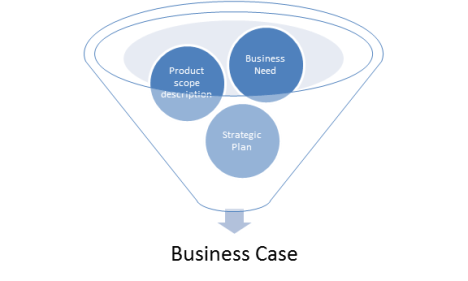
How is the business need different from the business case? The business case takes the business need outlined in the SOW (element 1 in the chart above) and justifies how the result of the project (element 2 in the chart above) will satisfy that need AND align with the strategic goals of the organization (element 3 in the chart above). It is the analysis that ties together the 3 elements of the SOW like so:
c. Agreements

As mentioned above, IF the product is to be made for a customer in an external organization, then the SOW may come EITHER in the form of a procurement document OR a contract, both of which are covered under the category of Agreements.

So the SOW may come internally or externally (input #1 or input #3), and is analyzed in what is called the business case (input #2). As the “seed” of the project, it is then taken into the Initiating Process group through process 4.1 Develop Project Charter, where it is developed into the Project Charter (the output of the process) through two techniques, Expert Judgment and Facilitation Techniques.

This concludes the discussion of the Project Statement of Work, the input to Process 4.1 Develop Project Charter. The next post will deal with the output of Process 4.1 Develop Project Charter, by analyzing what the elements of the Project Charter are.

5th Edition PMBOK® Guide: Chapter 4: Develop Project Charter


The first project management process in the Integration Knowledge Area is under the Initiating Process Group and it is called Develop Project Charter.

Here is a list of the inputs, tools & techniques, and outputs used in the Develop Project Charter process.

1. Inputs, Tools & Techniques, and Outputs–summary

4.1 DEVELOP PROJECT CHARTER
INPUTS
1. Project Statement of Work Description of product, service or result to be delivered by project.
2. Business Case Business need, cost-benefit analysis
3. Agreements Contract or MOU (memorandum of understanding); used when project is being performed for external customer
4. EEFs Government or industry standards, organizational culture, marketplace conditions
5. OPAs Organizational policies and procedures, project document templates and corporate database of lessons learned
TOOLS & TECHNIQUES
1. Expert Judgment Used for analyzing technical and management-related details of inputs in order to develop the output (project charter)
2. Facilitation Techniques Brainstorming, conflict resolution, problem solving
OUTPUTS
1. Project Charter Formally authorizes the project

2. Inputs, Tools & Techniques, and Outputs–detail

In going over these elements, let’s start from the end and work backwards.

It should be no surprise that the Output of the “Develop Project Charter” process is the Project Charter.

The Tools & Techniques should be pretty understandable once it is understood what is in the Project Charter. It contains the high-level definitions of the project, the constraints, assumptions, risks and exclusions that determine the parameters within which the project must be carried out. Expert Judgment is a Tool & Technique because technical definitions of the product will require technical experts, and the justification of the project, the business case, will require experts familiar with the details of the external business need and the internal cost-benefit analysis.

To translate the requirements of the customer (or sponsor) into actual high-level objectives or deliverables requires the collaborative effort of many stakeholders, which is why Facilitation Techniques is the second Tool & Technique listed. Coming up with a list of requirements requires brainstorming, but if some of the requirements conflict with each other it is necessary to apply problem solving and conflict resolution in order to come up with a set of requirements that is consistent.

For the inputs, it should project statement of work, the “seed” of the project, is included, because it is the essence of “what” the project will create. The “why” of the project, its justification as far as the organization who is doing the project is concerned, comes up in the input of the “Business Case.”

If the project is external, the statement of work will come from a customer in the form of a contract or memorandum of understanding. This is the basis for the Agreements input.

The next two inputs are ones you will see throughout the processes: EEFs (Environmental Enterprise Factors) and OPAs (Operational Process Assets). For the EEFS, the external reasons for the project (part of the Business Case) are found in the governmental and industry standards, marketplace conditions, or organizational culture. The OPAs give the company the forms and templates for the project documents, the historical documents from previous projects to use as a reference, and the policies and procedures by which the project will be carried out.

This gives a general overview of these elements. In order to really understand the process in depth, however, we should look at the a) project statement of work and b) project charter to see exactly what are in each of them and how they compare and contrast. That will be the subject of the next post.

5th Edition PMBOK® Guide—Chapter 4: Integration Knowledge Area


1. Integration Knowledge Area—Introduction

The 1st of the 10 Knowledge Areas to be covered by the PMBOK® Guide is the Integration Knowledge Area. This knowledge area is the “heart and soul” of Project Management, in my opinion, because it takes ALL of the project management activities across the 5 process groups and down the other 9 knowledge areas and unifies, consolidates, communicates and integrates them into a single entity, THE PROJECT.

This is why the PMBOK® Guide lists it as the first of the knowledge areas. However, when you are learning about project management, having this be the first knowledge area you study may be difficult because t is arguably one of the most complicated of the knowledge areas. For that reason, the PMP/CAPM exam prep class that is put on by the Orange County chapter of the Project Management Institute actually teaches it LAST instead of first. So you may want to consider reviewing the material of the other knowledge area chapters first, and then coming back to the Integration Knowledge Area after you’ve covered all the rest.

2. Integration Knowledge Area—Summary of all Six Processes

You will notice that the Integration Knowledge Area is the ONLY knowledge area which has processes in all 5 process groups. There is one process for each process group, with Monitoring & Controlling having two groups.

Process

Group

Process

Number

Process
Name
Process Description
Initiating 4.1 Develop Project Charter Develops document that formally authorizes project and provides project manager with authority to apply organizational resources to project activities.


Planning 4.2 Develop Project Management Plan Defines, prepares, and coordinates all subsidiary plans and baselines (from all 9 other knowledge areas) and integrates them into a comprehensive project management plan.


Executing 4.3 Direct and Manage Project Work Leads and performs work defined in project management plan and implements approved changes to achieve the project’s objectives.


Monitoring

& Controlling

4.4 Monitor and Control Project Work Tracks, reviews, and reports project progress against performance objectives defined in project management plan.


4.5 Perform Integrated Change Control Reviews change requests; approves changes and manages changes to deliverables, OPAs, or project management plan itself; communicates their disposition


Closing 4.6 Close Project

or Phase

Finalizes project across all PM process groups; formally closes project or phase

3.  Let’s take a closer look at the process descriptions.

4.1 Develop Project Charter

The Project Charter is the formal “green light” to the project and is done as part of the Initiating Process Group. It’s the high-level statement of what the project will accomplish, why it is being done (the business case), and the high-level assumptions, risks, and constraints within which the project must operate. Although the project manager should be assigned at this stage, the focus here is on the approval that must be obtained from the sponsor, and that is the basic purpose behind the project charter.

4.2 Develop Project Management Plan

The next four processes can be understood through the original Deming PLAN-DO-CHECK-ACT cycle which describes process improvement in general. The PLAN part comes with the Project Management Plan, which is obviously part of the Planning Process Group. This process combines a) the individual management plans of all the knowledge areas (Scope Management Plan, Cost Management Plan, etc.), and b) some other management plans (such as Change Management Plan) and integrates them together into the Project Management Plan.

4.3 Direct and Manage Project Work

This is the DO part of the Deming PLAN-DO-CHECK-ACT cycle, and the process belongs in the Executing Process Group. Notice that it is doing the work in the plan PLUS any approved changes. The changes get evaluated and approved in the Monitoring & Controlling Process under process 4.5 Perform Integrated Change Control, but get implemented here in this process, 4.3 Direct and Manage Project Work.

4.4 Monitor and Control Project Work

This is the CHECK part of the PLAN-DO-CHECK-ACT cycle, which is the Monitoring part of the Monitoring & Controlling Process Group. What are you checking for? To see if the project is progressing as planned in process 4.2 Develop Project Management Plan. What happens if you’re NOT on track and you want to get back? Then you go to the NEXT process, which is …

4.5 Perform Integrated Change Control

This is the ACT part of the PLAN-DO-CHECK-ACT cycle, which is the Controlling part of the Monitoring & Controlling Process Group. What are you controlling? You are controlling the project so that if it gets off track from any of the performance baselines, you can then suggest, evaluate, and then either approve or reject changes that help you get it back on track. If the changes are approved, then and only then do they get implemented back in the Executing Process Group under process 4.3 Direct and Manage Project Work.

4.6 Close Project or Phase

If the project does proceed to the point where the deliverables are completed within the plan developed in process 4.2, then you get formal closure of the project or phase from the customer and/or sponsor of the project. Obviously this is part of the Closing Process Group. Or if the project gets to the point where it is decided that the project CANNOT be completed as specified in the project charter, the project may be terminated, but still much go through formal closure.

This is a general high-level description of the six processes in the Integration Knowledge Area. The next posts will discuss the six processes in detail.

5th Edition PMBOK® Guide—Chapter 3: Project Information and Knowledge Areas


1. Project Information

One of the innovations for the 5th Edition PMBOK® Guide is that PMI has made more consistent the distinction between data and information on a project. Data are the raw, unorganized observations and measurements identified during activities performed to carry out the project work. Information is what you get when you process data, organized it and presented in such a way that it is meaningful or useful. That information is transmitted in project documents called reports.

So here’s the distinction:

Knowledge category Explanation Examples
1. Work performance data Raw observations and measurements taken during executing process Actual costs, actual activity durations, technical performance measures


2. Work performance information Data is collected from controlling processes, analyzed and integrated Forecasted estimates to complete, implementation status of change requests


3. Work performance reports Information is presented in project documents Status reports, memos

2. Knowledge Areas

The first axis along which the 47 project management processes are organized is that of the five process groups; the other axis along which the 47 processes are organized is that of the 10 Knowledge Areas.

One of the innovations of the 5th Edition PMBOK® Guide is that there are 10 knowledge areas now instead of 9.

The 10 Knowledge Areas are:

PMBOK Chapter Knowledge Area
1. Chapter 4 Project Integration Management
2. Chapter 5 Project Scope Management
3. Chapter 6 Project Time Management
4. Chapter 7 Project Cost Management
5. Chapter 8 Project Quality Management
6. Chapter 9 Project Human Resources Management
7. Chapter 10 Project Communications Management
8. Chapter 11 Project Risk Management
9. Chapter 12 Project Procurement Management
10. Chapter 13 Project Stakeholder Management

The 47 processes are displayed on page 61 of the PMBOK® Guide.

The next 10 chapters of the PMBOK® Guide systematically go through each of the 10 knowledge areas. Each knowledge area will cover the processes in each area, giving the inputs, tools and techniques, and outputs to each of those processes.

This concludes the summary of Chapter 3 of the PMBOK® Guide. The next posts will cover Chapter 4 of the PMBOK® Guide.

5th Edition PMBOK® Guide—Chapter 3: Closing Process Group


This post covers the last of the five process groups, the Closing Process Group.

1. Closing Process Group—Purpose

The purpose of the Closing Process Group according to the PMBOK® Guide is to conclude all activities across all Project Management Process Groups to formally complete the project, phase, or contractual obligations.

A key word in this definition is the word formally, which means that the conclusion of the project has to be documented. (Whenever you see the word formally, think “in writing”.) The phrase “contractual obligations” covers two sets of obligations that the organization may be under:

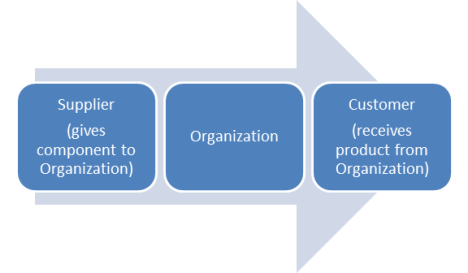
a) if the organization doing the project is a buyer receiving some component from a supplier (in order to make the finished product), the contractual obligation to the supplier is to compensate the supplier according to the agreed upon terms of the procurement contract, and

b) if the organization doing the project is providing the finished product to a customer.

the obligation to the customer, the contractual obligation to the customer is to provide the customer with the finished product according to the agreed upon criteria for acceptance.

These two sets of contractual obligations are contrasted visually in the diagram below.

The first set of contractual obligations is covered under the Close Procurements process, and the second set of contractual obligations is covered under the Close Project or Phase process in the Closing Process Group. Those two processes are in fact the only processes in that process group.

2. Close Project or Phase—three scenarios

There are three separate scenarios covered by the Close Project or Phase process.

a. Phase complete

Let’s take the situation where the project is complicated enough that your organization has decided during the Initiating Process Group that the project will be split into several phases. A phase is like a mini-project in that it will comprise the five process groups including the Closing Process Group. In this case, the Close Project or Phase process really means Close Phase. The deliverables for that phase must be validated internally within the organization and then, if the final product is destined for a customer, must be verified (externally) by that customer. If this internal validation and external verification by the customer are both successful, THEN the project may continue to the next phase.

b. Project complete

Let’s say that the project, whether it consists of one phase or many phases, is now at the point where the final product has been produced. In this case, the Close Project or Phase process really means Close Project. An essential part of this process is delivering the final product to the customer. The customer must then either formally accept or reject the product. If the customer formally accepts the product, and pays the agreed upon compensation for that product, then the contractual obligations of your organization and the customer are both fulfilled, and the project may proceed to conclusion.

c. Project terminated

Let’s say that the customer, instead of formally accepting the product, formally rejects it because it does not meet the customer’s expectations. There may be a request for rework, or some other terms on which the customer may accept the product if your organization makes suggested changes to make the product meet the customer’s expectations. If your organization is unwilling or unable to meet the customer’s expectations as far as the product is concerned, then the project may be terminated, and there will be legal repercussions for your inability to fulfill the contractual obligation to the customer.

Even if there is no customer, the project may be terminated because the sponsor concludes that the project no longer is able to be completed within the scope, time and budget constraints of the project set forth in the project charter.

This situation when a project is terminated is also referred to in the PMBOK® Guide as premature closure.

In either case, if the project is terminated, that doesn’t mean that the Close Project or Phase process is skipped. In this scenario, the organization must still document why the project was terminated so that the lessons learned on this failed project can be used to prevent such an occurrence on future projects.

So in summary the above three scenarios may all lead to the Close Project or Phase:

3. Close Process of Phase—categories of activities

The closing process actually covers three separate types of closure: closure of procurements, internal closure (administrative and financial), and external closure (formal acceptance of deliverables). These three terms for the categories of activities are not in the PMBOK® Guide, but they are terms which I am using in order to make sense of the list of activities presented in the PMBOK® Guide.

Here’s the list of activities presented in the PMBOK® Guide divided into three categories in order to bring a little more conceptual clarity to the overall process. NOTE: These activities are listed by category. The internal closure activities are in blue, the external closure activities are in green, and the closure of procurement activities are in yellow.

Category Activity NOTES
1. Internal Closure Confirm that the defined processes are completed to produce final product of the project. Focus is on processes (quality assurance)
2. Internal Closure Validate (internally) that the product of the project meets acceptance criteria. Focus on deliverables (quality control)
3. External Closure Deliver final product of the project to the customer or sponsor. The moment of truth!
4. External Closure Obtain final acceptance of the product of the project from the customer or sponsor. If product rejected, project may be terminated.
5. Internal Closure Complete financial records and release unused project resources. Important for”lean” practice!
6. Closure of Procurements Close out all procurement activities and ensure termination of all procurement agreements. May be conducted earlier than project closure.
7. Internal Closure Document lessons learned (part of corporate knowledge base, a category of Organizational Process Assets). Why reinvent the wheel next time?
8. Internal Closure Update all processes and procedures (a category of Organizational Process Assets). Crucial step for PMOs
9. Internal Closure Archive all project documents and templates in the project management information system (PMIS) NOTE: PMIS is part of EEF, but documents are OPAs
10. Internal Closure Perform assessment of team members’ performance Another moment of truth!
11. Internal Closure Conduct review of project (or phase) performance This is the post-project review
12. Internal Closure Distribute final report of project (or phase) performance. Time to celebrate (if project successful)!

Note that the Closure of Procurements category (listed in yellow) is part of the Close Procurements process within the Closing Process Group; the Internal Closure and External Closure categories (listed in blue and green, respectively) are part of the Close Project or Phase process within the Closing Process Group.

This concludes the review of the last of the 5 process groups, the Closing Process Group.

The final post for Chapter 3 will deal with how project information is categorized, and a brief introduction to the knowledge areas.

5th Edition PMBOK® Guide—Chapter 3: Monitoring & Controlling Process Group


This post covers the 4th of the five Process Groups, the Monitoring & Controlling Process Group.

1. Monitoring & Controlling Process Group—Purpose

According to the PMBOK® Guide, the purpose of the Monitoring & Controlling Process Group is to

  1. Track, review, and orchestrate the progress and performance of the project;
  2. Monitor the ongoing project activities against the project management plan and the project performance measurement baseline;
  3. Identify corrective or preventive action, or areas in which changes to the plan are required;
  4. Control the changes and implement only those approved

The first two cover the Monitoring part of the process group, and the last two cover the Controlling part of the process group and are what are referred to as change management.

2. Monitoring Process

The progress of the project is monitored and measured throughout the course of the project, with reports of the progress going on a predetermined regular basis to the various key stakeholders.

3. Controlling Process

a. Change Management

Let’s say there is a need for a change. Either a mistake has been made, and rework must be done. That is an example of correcting a past mistake. Or you notice that something is being done wrong right now, and you need to take corrective action on this present mistake. If you are really a far-sighted project management, you notice that if you carry out the project management plan as written, you are headed towards the making of a mistake. So you need to take preventive action on this future mistake to prevent it from happening.

Then you go through the change request process, which means first of all analyzing what affect the proposed change would have on the various project constraints. Only when this analysis is done and brought to the change control board, or whatever process your organization has in place for reviewing and deciding on which changes to implement. THEN you implement the change in the Executing Process Group.

Sometimes corrective or preventive action is not sufficient to keep the project going according to the project management plan. It may be that the change is of sufficient magnitude that it requires a change in the project management plan, in which case there is a return to the Planning Process Group to revise the plan, and then the change is implemented in the Executing Process Group.

b. Change Management Plan

Part of the change control process may be a level of authority required in order to make the change. Some changes can be okayed by the project manager; other changes that have greater impact on the project may require the input of the customer, the sponsor, or other key stakeholders. In any case, the system needs to be worked out ahead of time in the change management plan, which is one of the subsidiary plans in the project management plan.

c. Configuration Management Plan

To keep track of the various changes, so everybody knows what version of the project management baseline is being implemented, there is something called the configuration management plan¸ which controls the project documents in such a way that everyone working on the project knows what is the current version of the project plan.

This concludes the brief synopsis of the Monitoring & Controlling Process Group. The next post covers the last of the 5 process groups, the Closing Process Group.

5th Edition PMBOK® Guide—Chapter 3: Executing Process Group


This post covers the 3rd of the 5 project management process groups, namely, the Executing Process Group. Ironically, although its activities consume the largest portion of the project’s budget, its description in the PMBOK® Guide is the shortest of all the process groups.

1. Executing Process Group–Purpose

The definition of the process group is pretty straightforward:

The Executing Process Group consists of those processes performed to complete the work defined in the project management plan to satisfy the project expectations.

However, one thing to notice in this definition is the part where it says “satisfy the project expectations”. Adding any additional work that goes “above and beyond” the project expectations is called “gold-plating”, and it is something to be avoided as an unnecessary expense.

2. Executing Process Group—Interactions with other Process Groups

There are interactions with the other process groups that should be noted, in particular dealing with the process of evaluating and executing changes to the project.

a. Change Management Process

Let’s say there is a need for a change. Either a mistake has been made, and rework must be done. That is an example of correcting a past mistake. Or you notice that something is being done wrong right now, and you need to take corrective action on this present mistake. If you are really a far-sighted project management, you notice that if you carry out the project management plan as written, you are headed towards the making of a mistake. So you need to take preventive action on this future mistake to prevent it from happening. The need for these types of changes is done in the Monitoring & Controlling Process Group.

Then you go through the change request process, which means first of all analyzing what affect the proposed change would have on the various project constraints. Only when this analysis is done and brought to the change control board, or whatever process your organization has in place for reviewing and deciding on which changes to implement, THEN you implement the change in the Executing Process Group.

b. Minor changes and changes to the plan

Now the repair, corrective, or preventive action that is done in the Executing Process Group may be relatively minor. It may be something you need to do differently in order to adhere to the project management plan. However, you may realize that the change is so great, that you will not be able to follow the project management plan and may need to make adjustments to the plan itself. For example, additional rework may require extra time, or may require extra resources to be done within the same time constraint. In either case, you’ll have to change the schedule or the budget to establish a new cost and schedule baseline. Therefore, you will need to make a change in them and update the project management plan. So a change may be implemented in the Executing Process Group, but may also require a change in the Planning Process Group as well.

c. Major changes and changes to the project charter

One additional possibility that is not explicitly mentioned in this section of the PMBOK® Guide is if the magnitude of the change is so severe that it may cause a change in one of the constraints that is large enough to go outside of the boundaries of the project charter itself. For example, if a project HAS to be done according to the project charter within 2 months, and a change requires that the project will take 3 months, then the project manager has to alert the sponsor, and so then the Initiating Process Group is activated.

d. Catastrophe changes and project closure

The sponsor has to decide basically whether to give more resources to the project in order to allow it to be done within the time limits demanded in the project charter, or if those resources are not available, whether the project charter can be rewritten to accommodate the new changes, or in the last resort whether it may be best to just terminate the project altogether. This would then cause the project to go into the Closing Process Group where it is formally closed. This is obviously an extreme position, but it obviously is a possibility so you need to keep it in mind.

So in conclusion, the change process always involves the Monitoring & Controlling Process Group (to evaluate it) and the Executing Process Group (to carry it out), but it sometimes may involve the Planning Process Group (to update the project management plan) or in rare cases the Initiating Process Group (to see if the change causes the project to go outside of the boundaries set forth in the project charter) and the Closing Process Group (to close the project if it indeed does go outside the project charter boundaries).

The next post deals with the Monitoring & Controlling Process Group, the 4th out of 5 process groups.

5th Edition PMBOK® Guide—Chapter 3: Planning Process Group


This post is going to discuss some general points about the 2nd of the process groups, the Planning Process Group.

1. Planning Process Group—Purpose

According to the PMBOK® Guide, the purpose of the Planning Process Group is to a) establish the total scope of the project, b) define and refine the objectives, and c) develop a course of action to achieve those objectives.

The output of the Planning Process Group is the Project Management Plan, which contains within it the management plans for all the knowledge areas, and the project documents (schedule, budget, risk register, etc.). The 5th Edition of the PMBOK® Guide has made sure that each knowledge area has its associated planning process specifically named. Then, in the Integration Knowledge Area, the process 4.2 Develop Management Plan should be understood to be an integration of all the management plans of the other knowledge areas.

2.  Planning Process Group–Relationship to the other Process Groups

Three things are worth noting about the Planning Process Group and its relationship to the other Process Groups.

a. Planning actually starts in Initiating Process Group

In the initiating process group, high-level planning of the three basic constraints on a project, the scope, time and budget, but at a high-level. These are then planned in more detail in the Planning Process Group.

b. Executing Process Group can start before Planning Process is complete.

If a project is complex, then the project may start to be executed after detailed planning of only the initial phase of the project is complete, with details of the following phases coming later on as the project progresses and more information and characteristics about the project are understood This is referred to as rolling-wave planning or progressive elaboration.

c. Planning Process may be revisited as a result of Monitoring & Controlling

If during the monitoring & controlling process, significant changes are requested to the project, then the a) Project Management Plan and the b) Project Documents may need to be revised to reflect these changes.

Besides the Planning Process Group interacting with the different process groups, there is also interaction within the Planning Process Group between knowledge areas. For example, risk management may uncover that the cost and schedule estimates are too optimistic, and therefore require a revising of the cost and schedule management plan.

The next process group is the Executing Process Group, which will be covered in the next post.

5th Edition PMBOK® Guide—Chapter 3: Initiating Process Group


This next series of posts goes through the five process groups, but before I start on the Initiating Process Group, I would like to summarize some general points about the five process groups.

1. Project Management Process Groups

The PMBOK® Guide stresses that the process groups are not the same as life cycle phases. Phases are for the most part sequential, although they can be overlapping (or in rare cases, even parallel). Process groups are iterative, meaning there is a back-and-forth movement between various process groups during the course of the project.

2. Initiating Process Group—Purpose

The initiating process is for defining a new project or phase and for obtaining authorization to start the project. It aligns the stakeholders expectations with the project’s purpose, gives them visibility of the scope and objectives, and demonstrates to them how their participation in the project can ensure those expectations are achieved.

3. Initiating Process Group—Components

What are the activities done in the Initiating Process Group?

A project manager is selected. That manager needs to understand the general company culture and external forces such as regulations. That manager needs to see if the project is new or similar to ones that have done before. If similar to ones done before, the historical records of those projects will need to be consulted. If new or complex, the project may be divided into phases.

Next the project charter must be created. One of the components of this charter is the business case, which states what the project will create, and why the company is going to undertake the project. What need will it fulfill, both externally (e.g., market demand) and internally (profit or return on investment)? Then the specific objectives and success criteria for the project are determined, and the constraints of time and cost (schedule and budget) within which the project must be completed are identified.

All these elements go into the project charter, which is then reviewed by the sponsor, who then will authorize the project to be done, which then releases the financial resources to be able to complete the project.

Another crucial element of the Initiating Process Group is identifying stakeholders and developing a strategy for managing their expectations. Different stakeholders will have different levels of involvement depending on their interest in the project and their level of authority over it.

Fig. 1 Steps of Initiating Process Group

Category Explanation
1. Authority The project manager is selected.
2. EEF Company culture + external cultural/political constraints (regulations, etc.) considered
3. OPA Historical records consulted (if similar project was done before)
4. Life Cycle Project may be broken up into phases if new or complex
5. Stakeholders Internal, external stakeholders identified, stakeholder management strategy developed
6. Business Need Reason for doing project identified: external (demand) + internal (profit)
7. Scope Initial scope defined (high-level requirements)
8. Objectives Project objectives, success criteria defined
9. Budget, schedule High-level budget, schedule constraints determined
10. Project Charter Project charter produced: contains elements 6, 7, 8, 9
11. Approval Sponsor approval of Project Charter commits financial resources to project

These steps are not necessarily chronological in order, although I tried to list them thematically so that they could be better understood. That is why all the elements that comprise the project charter are listed before the project charter itself.

The next post will deal with the Planning Process Group.

5th Edition PMBOK® Guide—Chapter 3: Project Management Processes


This post contains the general description of project management processes to be found at the beginning of chapter 3 of the 5th Edition of the PMBOK® Guide.

1. Project Management vs. Product-Oriented Processes

There are two types of processes, project management processes and product-oriented processes. Project management processes apply globally to all projects; product-oriented processes are specific to each application area. For that reason, since it is meant as a guide for projects in general,  PMBOK® Guide only deals with the 47 project management processes.

2. Project Management Processes

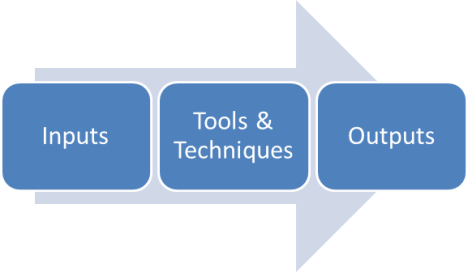
A project management process contains tools and techniques which operate on inputs and create as an end result outputs. These outputs often then became inputs of other processes.

3. The 5 Process Groups

The 47 project management processes are divided into five process groups:

Process Group

Characteristics

Initiating Defines a new project or new phase of an existing project to obtain authorization to proceed with the project.
Planning Establishes the scope of the project, defines the objectives, and defines the course of action required to achieve them.
Executing Completes the work defined in the project management plan to satisfy the project specifications.
Monitoring & Controlling Tracks, reviews, regulates progress and performance of project; identifies any potential changes to the plan and then initiates them.
Closing Finalizes all activities to formally close project or phase.

4. Interaction between Process Groups

When a project is split into phases, the phases are usually sequential, but they can overlap. As oppose to a phase of a project, the five process groups ALL overlap to some extent.

While executing a project, monitoring & controlling is done on a periodic basis to make sure that the project is proceeding according to plan. If it is not proceeding according to plan, then a change to the plan may be required, and so planning may be revised. During the course of executing the project, if you are receiving components from suppliers, you will need to formally close these procurements by accepting them (or suggesting changes if they are not accepted). So the phases can be overlapping AND in some cases parallel.

This also is true for the initiating process group in that it actually involves some high-level planning of the project. Also, major changes suggested during the monitoring & controlling process group may require a look at the charter to see if the project can indeed be completed within its original parameters.

The one word that describes the process group interaction the best is iterative, meaning that there is a back-and-forth movement among them until the project is completed.

The next posts deal in a little more detail with the 5 process groups in order to make you familiar with their function on a project.