Passing the #PMP Exam: Inputs and Outputs—Scope Knowledge Area


 1. Introduction

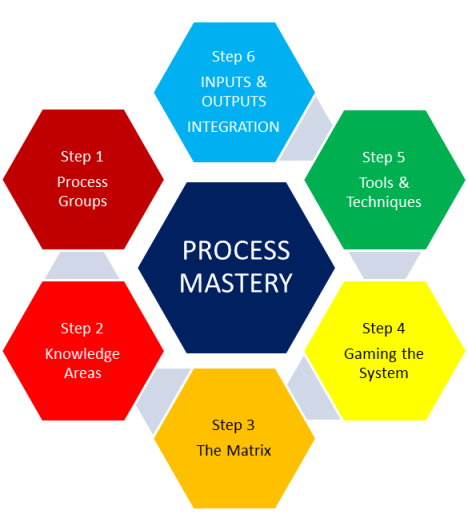
In this next series of posts on memorizing the processes, we move on to the final step 6, which is memorizing the INPUTS & OUTPUTS associated with each of the 42 processes. In order to breakdown the memorization into more bite-size chunks, I am going to break down this topic into at least 9 posts, one for each knowledge area. (There may be some knowledge areas that require more than one post.)

This post covers chapter 5 of the PMBOK® Guide, which covers the Scope Knowledge Area. This knowledge area contains 5 processes, three of which are in the Planning Process group, and two of which are in the Monitoring & Controlling Process Group.

2. Review of processes in Integration Knowledge Area

As a review, here is a chart which gives a summary of the processes themselves, plus the tools & techniques used as part of that process.

Process
Number & Name
Process Description Tools & Techniques
5.1 Collect Requirements Defining and documenting stakeholders’ needs to meet the project objectives. 1. Interviews

2. Focus groups

3. Facilitated workshops

4. Group creativity techniques

5. Group decision making techniques

6. Questionnaires and surveys

7. Observations

8. Surveys


5.2 Define Scope Developing a detailed description of the project and product. 1. Expert judgment

2. Product analysis

3. Alternatives identification

4. Facilitated workshops


5.3 Create WBS Subdivides project deliverables and project work into smaller, more manageable components.


1. Decomposition
5.4 Verify Scope Formalizing acceptance of the project deliverables with the customer.


1. Inspection
5.5 Control Scope Monitoring status of the project and product scope and managing changes to the scope baseline. 1. Variance analysis

3. Definition of inputs, outputs

The inputs for a given process are the documents or results of other processes that are used in order to do the process. The results of going through the process are the outputs. These outputs are then used as inputs for some other process.

4. Generic inputs

Before we start, there are two “generic” inputs that are used in many, many processes. The term “generic” inputs is not to be found in the PMBOK® guide; that’s just my term I made up in our study group to clue people in to the fact that they are included as an input in more processes than you could probably name off the top of your head.

A. ENVIRONMENTAL ENTERPRISE FACTORS (EEF)

This is the “company culture”, or factors that are external to the project but which influence the project’s success. These can include the company databases and, in particular, the project management software used by the company.

B. OPERATIONAL PROCESS ASSETS (OPA)

Written procedures, policies, and guidelines that are used by the company to guide all operations, including projects. Lessons learned would be an important part of OPA.

Think of the operational process assets as the “hard copy” (written procedures), and the environmental enterprise factors as the “soft copy” (software and the company culture or “unwritten rules” that govern how work is done).

NOTE: Tools & Techniques will be listed for the purpose of completeness and for reference, but their detailed description will be omitted, because it is contained in the blog posts specifically covering Tools & Techniques for that knowledge area.

5.1 COLLECT REQUIREMENTS

.
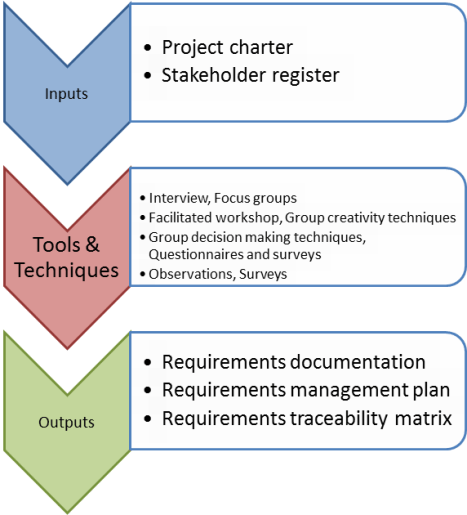
In the process Collect Requirements, you define and document stakeholders’ needs to meet the project objectives, and you define and manage customer expectations.

INPUTS

5.1.1 Project charter

The process is done by analyzing the information contained in the project charter, which contains high-level project requirements and a product description. From these detailed product requirements will be developed.

5.1.2 Stakeholder register

The process is done by analyzing the information contained in the stakeholder register. From the stakeholder register, those stakeholders can be identified who might have pertinent information on detailed project and product requirements.

TOOLS & TECHNIQUES

5.1.1 Interviews

5.1.2 Focus groups

5.1.3 Facilitated Workshops

5.1.4 Group creativity techniques

5.1.5 Group decision making techniques

5.1.6 Questionnaires and surveys

5.1.7 Observations

5.1.8 Surveys

OUTPUTS

5.1.1 Requirements documentation

The whole purpose of this process is to take high-level requirements and make them more detailed.

The requirements document describes how individual requirements meet the business need for the project. The document lists all the requirements categorized by stakeholder and priority.

5.1.2 Requirements management plan

This plan documents how the requirements will be analyzed, documented, and managed throughout the project.

5.1.3 Requirements traceability matrix

This matrix lists the requirements to their origin (i.e., from which stakeholder) and traces them throughout the project life cycle to see if they have been met. It also can link the requirements to the business and project objevtives. Fnally, it can provide a structure for managing changes to the product scope.

5.2 DEFINE SCOPE

The Define Scope develops a detailed description of the project and product and prepares a project scope statement.

INPUTS

5.2.1 Project charter

This contains the high-level project description and product characteristics, as well as the project approval requirements. This is an output of the 4.1 Develop Project Charter process.

5.2.2 Requirements Documentation

This is the output of the 5.1 Collect Requirements process.

5.2.3 Organizational Process Assets

Templates for a project scope statement can be used and altered for this particular project.

TOOLS & TECHNIQUES

5.2.1 Expert judgment

5.2.2 Product analysi

5.2.3 Alternatives identification

5.2.4 Facilitated workshops

OUTPUTS

5.2.1 Project scope statement

The project scope statement contains the following:

Document

Explanation

1.

Project scope description

Characteristics of the product, service or result to be produced by the project.

2.

Product acceptance criteria

The criteria for acceptance of the completed product, service, or result.

3.

Project deliverables

The product, service, or result of the project plus reports of the management of the project.

4.

Project exclusions

What is agreed to be out of scope for the project.

5.

Project constraints

Constraints on the project scope, predetermined budget, imposed completion and/or schedule milestone dates,

6.

Project assumptions

Assumptions associated with the project scope.

5.2.2 Project document updates

5.3 CREATE WBS
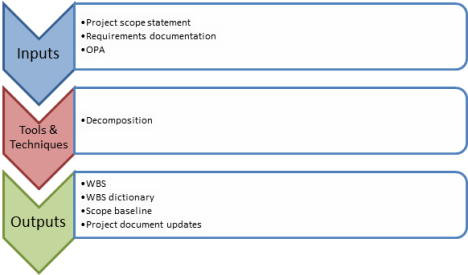
INPUTS

5.3.1 Project scope statement

This is the output for the previous process 5.2 Define Scope.

5.3.2 Requirements documentation

This is the output for the process 5.1 Collect Requirements

5.3.3 OPA

Templates or other project files from previous projects that may help in creating the WBS.

TOOLS & TECHNIQUES

5.3.1. Decomposition

OUTPUTS

5.3.1 WBS

It is obvious that WBS would be an output of the Create WBS process.

5.3.2 WBS dictionary

The WBS dictionary gives more detailed information on the components of the WBS, including who is responsible for doing the work, the cost estimates for doing that work, etc.

5.3.3 Scope baseline

The scope contains the following documents

  • Project scope statement—the output of 5.2 Define Scope
  • WBS—output of this process 5.3 Create WBS
  • WBS dictionary—output of this process 5.3 Create WBS

5.3.4 Project document update

Requirements documentation may need to be updated after the detailed WBS is created.

5.4. VERIFY SCOPE

INPUTS

5.4.1 Project management plan

This is the output from the 4.2 Develop Project Management Plan process.

5.4.2 Requirements documentation

This is the output from the 5.1 Collect Requirements process.

5.4.3 Requirements traceability matrix

This is the output from the 5.1 Collect Requirements process.

5.4.4 Validated deliverables

These are deliverables which have been internally checked for correctness; they are the output of 4.5 Perform Quality Control Process.

TOOLS & TECHNIQUES

5.4.1 Inspection

OUTPUTS

5.5.1 Accepted deliverables

The Verify Scope process takes the deliverables which are internally validated and shows them to the customer for their acceptance. Once these are formally signed off and approved by the customer or sponsor, they are considered accepted deliverables.

5.5.2 Change requests

If the deliverables are not accepted, then change requests may be necessary to bring them into compliance with the customer’s requests.

5.5.3 Project document updates

Documents that contain the product status will need to be updated to reflect the acceptance or rejected by the customer.

5.5 CONTROL SCOPE

INPUTS

5.5.1 Project management plan

This is the output of the process 4.2 Develop Project Management Plan

5.5.2 Work performance information

This is information about the progress towards completing the deliverables.

5.5.3 Requirements documentation

This is the output from the 5.1 Collect Requirements process.

5.5.4 Requirements traceability matrix

This is the output from the 5.1 Collect Requirements process.

5.5.5 Organizational Process Assets

Monitoring and reporting methods, policies towards controlling scope.

TOOL & TECHNIQUES

5.5.1 Variance analysis

OUTPUTS

5.5.1 Work performance measurements

The comparison is given between the amount of progress towards completing the deliverables and the planned amount of progress (the variance). This is to be communicated to stakeholders.

5.5.2 Organizational Process Assets updates

The cause of any variance, and any corrective action to be taken.

5.5.3 Change requests

There can be a request for preventive, corrective actions, or defect repairs. Or there can be a change request to the scope baseline.

5.5.4 Project management plan updates

These can include updates to the scope baseline (scope statement, WBS, or WBS dictionary).

5.5.5 Project document updates

Requirements documentation and requirements traceability matrix.

The next post will cover the inputs and outputs of the time knowledge area.

#Toastmasters—Retaining Membership through Mentoring


One of the key advantages of being a member of Toastmasters is to improve your own speaking and leadership skills. For those of us who have been in the program a while, another advantage slowly starts coming into focus:  the ability to improve other people’s speaking and leadership skills. This is done by passing on what you know to other newer members through the process of mentoring.

This post will explore what mentoring entails, and what benefits it brings to you, the person you are mentoring, and the club in general.

1. Why is mentoring important?

A new member is learning a lot by just observing what is going on at a meeting, but there is so much going on that the new member doesn’t even know the significance of it. I was in our club for over a month before I figured out that why it was important to bring the Competent Leadership manual with me to the Toastmasters meeting. I had heard someone mention that I should bring it for many meetings, but they never explained why. Eventually I just asked someone and they told me.

However, it was then I realized that I had already done two supporting roles at the club for which I could have gotten credit for in that Competent Leadership manual, but it was now too late and that effort had been “wasted” in my mind. If I had been assigned a mentor, that person would no doubt have explained the whole Competent Leadership manual system to me.  I was determined that I would make sure this did not happen to anybody else when they entered the club.

2. What does mentoring entail?

A new member is assigned a mentor, and sometimes we refer to the person being mentored as a mentee. The mentor has a half-hour face-to-face session with the mentee in which the Competent Leadership manual is explained. Also, the mentor encourages the mentee to start working on his or her first speech, the Icebreaker speech from the Competent Communicator manual. Then the mentor is “on call” so that the mentee can feel free to ask further questions whenever they occur. This mentorship continues until the new member has completed 3 speeches in the Competent Communicator Manual.

3. What are the advantages for the new member?

The new member understands the significance of what is going on at the meeting, and therefore feels more like a member of the club rather than an observer. Some members need help in preparing speeches, and some don’t. However, it is a real confidence-building measure to have the assurance of knowing that there is always someone there whom you can e-mail or call if you have any questions.

4. What are the advantages for the mentors?

  • You have the satisfaction of helping a new member grow right in front of your eyes for the first three speeches of their Toastmasters career.
  • You get credit in the Competent Leadership manual for Project 9 (out of 10).
  • You get credit towards your Advanced Communicator Gold award.

5. What are the advantages for the club?

This is where the title of this blog post comes in.

  • You will foster ties between the new members and the established members, making the club more cohesive.
  • You will increase your club membership by retaining the members you already have and thus reducing attrition of new members.

I can attest to this last point in our club, as we had someone who essentially joined two different clubs because she had a hard time deciding which she liked better. They both were attractive to her, but after being in the clubs for a few months, she made the decision to continue the membership in our club and drop the membership in the other. Why? Because of our mentorship program. She felt she was getting a lot more “personalized attention” because of our program, and so that’s what gave our club the edge.

In our club, it has become an important tool for the retention of new members, but it also it useful for members who are not new, but still feel lacking in confidence. One member after completing three months of being mentored, asked for another mentor so he could feel comfortable asking the new mentor any questions. He had come a long way in three months, but felt he still had a lot more learning to do, and felt having a mentor again would give him that additional confidence to more forward.

So in summary, for both new and existing members, the mentorship program is an overlooked but often powerful tool in making sure you retain members and boosting the camaraderie of the club. Learn about this tool and use it in your club!

Passing the #PMP Exam: Inputs and Outputs—Integration Knowledge Area (part 2)


 1. Introduction

In this next series of posts on memorizing the processes, we move on to the final step 6, which is memorizing the INPUTS & OUTPUTS associated with each of the 42 processes. In order to breakdown the memorization into more bite-size chunks, I am going to break down this topic into at least 9 posts, one for each knowledge area. (There may be some knowledge areas that require more than one post.)

 This post covers chapter 4 of the PMBOK® Guide, which covers the Integration Knowledge Area. This knowledge area contains 6 processes, with at least one process in each of the 5 process groups, with Monitoring & Controlling Process having two processes from this area.

 I am splitting the discussion of the Inputs & Outputs into two different posts; this post will cover Processes 4.4 through 4.6.

2. Review of processes in Integration Knowledge Area

As a review, here is a chart which gives a summary of the processes themselves, plus the tools & techniques used as part of that process.

Process
Number & Name
Process Description Tools & Techniques
4.1 Develop Project Charter Develops document that formally authorizes project and documents stakeholder needs & expectations


1. Expert judgment
4.2 Develop Project Management Plan Documents integration of all subsidiary plans (from all knowledge areas); project management plan is primary source on how to manage project across all PM process groups


1. Expert judgment
4.3 Direct and Manage Project Execution Performing work defined in project management plan 1. Expert judgment

2. Project management information system


4.4 Monitor and Control Project Work Tracking progress to meet performance objectives defined in project management plan


1. Expert judgment
4.5 Perform Integrated Change Control Reviewing change requests and managing changes to deliverables, or project management plan itself


1. Expert judgment

2. Change control meetings

4.6 Close Project or Phase Finalizes project across all PM process groups; formally closes project 1. Expert judgment

3. Definition of inputs, outputs

The inputs for a given process are the documents or results of other processes that are used in order to do the process. The results of going through the process are the outputs. These outputs are then used as inputs for some other process.

4. Generic inputs

Before we start, there are two “generic” inputs that are used in many, many processes. The term “generic” inputs is not to be found in the PMBOK® guide; that’s just my term I made up in our study group to clue people in to the fact that they are included as an input in more processes than you could probably name off the top of your head.

A. ENVIRONMENTAL ENTERPRISE FACTORS (EEF)

This is the “company culture”, or factors that are external to the project but which influence the project’s success. These can include the company databases and, in particular, the project management software used by the company.

B. OPERATIONAL PROCESS ASSETS (OPA)

Written procedures, policies, and guidelines that are used by the company to guide all operations, including projects. Lessons learned would be an important part of OPA.

Think of the operational process assets as the “hard copy” (written procedures), and the environmental enterprise factors as the “soft copy” (software and the company culture or “unwritten rules” that govern how work is done).

NOTE: Tools & Techniques will be listed for the purpose of completeness and for reference, but their detailed description will be omitted, because it is contained in the blog posts specifically covering Tools & Techniques for that knowledge area.

4.4 MONITOR AND CONTROL PROJECT WORK

INPUTS

4.4.1 Project Management Plan

The project management plan is what the performance of the project is going to be measured against.

4.4.2 Performance Reports

The performance reports show how the project is measuring up against the project management plan (4.4.1).

4.4.3 EEF

The usual suspect, the project management information system, is required. Just as in the executing phase, the shareholder risk tolerances need to be made aware of. Finally, the company work authorization system needs to be referenced as this process may end up producing change requests.

4.4.4 OPA

Lessons learned, risk control procedures, defect management procedures, etc.

TOOLS & TECHNIQUES

4.4.1 Expert Judgment

OUTPUTS

4.4.1 Change Requests

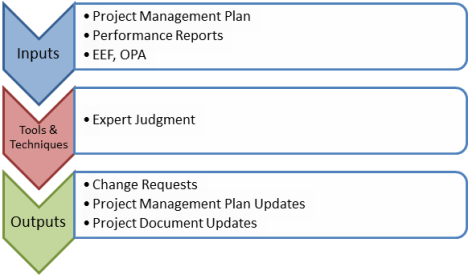
As a result of comparing the planned results (from the project management plan Input 4.4.1) to the actual results (from the performance reports Input 4.4.2), change requests may be issued. These could be actions to bring the results in line with the plan (changes to product deliverables), or it could be a change in the plan itself (changes to the project management plan).

Here are some change requests that affect the performance against the baselines.

Category Explanation
1. Corrective action Changes future performance so that the results are in line with the project management plan and the performance baseline.
2. Preventive action Reducing either the probability or impact of negative project risks so that the project remains along the performance baseline.
3. Defect repair Repairs products already produced as part of a project that are defective or replaces them.

However, as mentioned above, there could be changes which affect the project baselines themselves.

4.4.2 Project Management Plan Updates

Of course, if it is decided that the plan itself needs to be changed, then the Project Management Plan is updated. This could include any one of the component plans, or simply to one of the performance baselines (scope, schedule, or cost performance).

4.4.3 Project Document Updates

If issues are uncovered as a result of this monitoring and controlling process, then the issue logs will need to be updated. Also, forecasts of the overall budget (estimate at completion or EAC) and their comparison with the budget as originally planned (budget at completion) will need to be updated as well.

4.5 PERFORM INTEGRATED CHANGE CONTROL

First a word about the process of Perform Integrated Change Control. Just remember that there is configuration control, and change control. Change control refers to changes in the project work. Configuration control refers to changes in the deliverables or products that are the result of the project work.

INPUTS

4.5.1 Project Management Plan

The project management plan tells what the performance of the project is supposed to be.

4.5.2 Work Performance Information

The project management plan tells what the performance of the project actually is.

4.5.3 Change Requests

As a result of comparing the planned results (from the project management plan Input 4.4.1) to the actual results (from the performance reports Input 4.4.2), change requests may be issued. These could be actions to bring the results in line with the plan (changes to product deliverables), or it could be a change in the plan itself (changes to the project management plan).

Here are some change requests that affect the performance against the baselines.

Category Explanation
1. Corrective action Changes future performance so that the results are in line with the project management plan and the performance baseline.
2. Preventive action Reducing either the probability or impact of negative project risks so that the project remains along the performance baseline.
3. Defect repair Repairs products already produced as part of a project that are defective or replaces them.

However, as mentioned above, there could be changes which affect the project baselines themselves.

NOTE: These inputs to the Perform Integrated Change Control are the same as the Outputs to the previous process Monitor & Control Project Work.

4.5.4 EEF

Project management information system.

4.5.5 OPA

Change control procedures, procedures for approving and issuing change authorizations (it may require a different level of authority to approve the change depending on its extent), process measurements database.

TOOLS & TECHNIQUES

4.5.1 Expert Judgment

4.5.2 Change Control Meetings

OUTPUTS

4.5.1 Change Request Status Updates

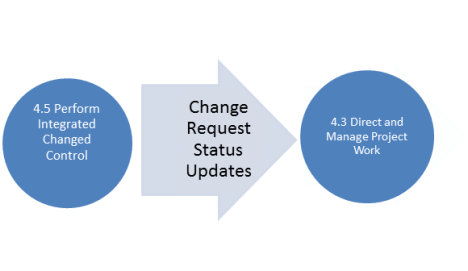
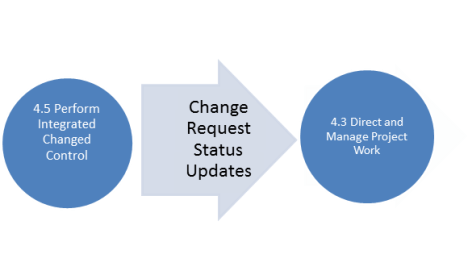
The change requests are processed according to the change control system by a Change Control Board or whatever system the company has in place. If the result of the change control system is that the change is approved, then and only then is it implemented by the Direct and Manage Execution process (see diagram below). the change request log gives the status of the change requests and tells whether the change is accepted or rejected.

4.5.2 Project Management Plan Updates

If the project management plan is changed or the performance baseline is changed, then updates to these are made.

4.5.3 Project Document Updates

The change request log (mentioned in output 4.5.1 Change Request Status Updates) is updated.

4.5 CLOSE PROJECT OR PHASE

INPUTS

4.6.1 Project Management Plan

The final version of the project management plan is used.

4.6.2 Accepted Deliverables

These are deliverables that are accepted by the customer, and are thus outputs of the 5.4 Verify Scope Process.

4.6.3 OPA

Project closure guidelines, and lessons learned knowledge base (to be updated as part of the process).

TOOLS & TECHNIQUES

4.6.1 Expert Judgment

INPUTS

4.6.1 Final product, service, or result transition

This is the hand-off of the final deliverable of the project, be it a product, service or result to the customer or sponsor.

4.6.2 OPA Updates

  • All of the documents from the project, such as the project management plan and the performance reports.
  • Project closure documents, such as the formal acceptance of the deliverable from the customer or the completed contract from the supplier.
  • Updated lessons learned database.

These are the inputs and outputs of processes 4.4 through 4.6.

The next posts will cover the inputs and outputs of the next Knowledge Area, that of Scope.

Passing the #PMP Exam: Inputs and Outputs—Integration Knowledge Area (part 1)


 1. Introduction

In this next series of posts on memorizing the processes, we move on to the final step 6, which is memorizing the INPUTS & OUTPUTS associated with each of the 42 processes. In order to breakdown the memorization into more bite-size chunks, I am going to break down this topic into at least 9 posts, one for each knowledge area. (There may be some knowledge areas that require more than one post.)

 This post covers chapter 4 of the PMBOK® Guide, which covers the Integration Knowledge Area. This knowledge area contains 6 processes, with at least one process in each of the 5 process groups, with Monitoring & Controlling Process having two processes from this area.

2. Review of processes in Integration Knowledge Area

As a review, here is a chart which gives a summary of the processes themselves, plus the tools & techniques used as part of that process. I am splitting the discussion of the Inputs & Outputs into two different posts; this post will cover Processes 4.1 through 4.3

Process
Number & Name
Process Description Tools & Techniques
4.1 Develop Project Charter Develops document that formally authorizes project and documents stakeholder needs & expectations


1. Expert judgment
4.2 Develop Project Management Plan Documents integration of all subsidiary plans (from all knowledge areas); project management plan is primary source on how to manage project across all PM process groups


1. Expert judgment
4.3 Direct and Manage Project Execution Performing work defined in projectmanagement plan 1. Expert judgment

2. Project management information system

4.4 Monitor and Control Project Work Tracking progress to meet performance objectives defined in project management plan


1. Expert judgment
4.5 Perform Integrated Change Control Reviewing change requests and managing changes to deliverables, or project management plan itself


1. Expert judgment

2. Change control meetings

4.6 Close Project or Phase Finalizes project across all PM process groups; formally closes project 1. Expert judgment

3. Definition of inputs, outputs

The inputs for a given process are the documents or results of other processes that are used in order to do the process. The results of going through the process are the outputs. These outputs are then used as inputs for some other process.

4. Generic inputs

Before we start, there are two “generic” inputs that are used in many, many processes. The term “generic” inputs is not to be found in the PMBOK® guide; that’s just my term I made up in our study group to clue people in to the fact that they are included as an input in more processes than you could probably name off the top of your head.

A. ENVIRONMENTAL ENTERPRISE FACTORS (EEF)

This is the “company culture”, or factors that are external to the project but which influence the project’s success. These can include the company databases and, in particular, the project management software used by the company.

B. OPERATIONAL PROCESS ASSETS (OPA)

Written procedures, policies, and guidelines that are used by the company to guide all operations, including projects. Lessons learned would be an important part of OPA.

Think of the operational process assets as the “hard copy” (written procedures), and the environmental enterprise factors as the “soft copy” (software and the company culture or “unwritten rules” that govern how work is done).

NOTE: Tools & Techniques will be listed for the purpose of completeness and for reference, but their detailed description will be omitted, because it is contained in the blog posts specifically covering Tools & Techniques for that knowledge area.

4.1 DEVELOP PROJECT CHARTER

INPUTS

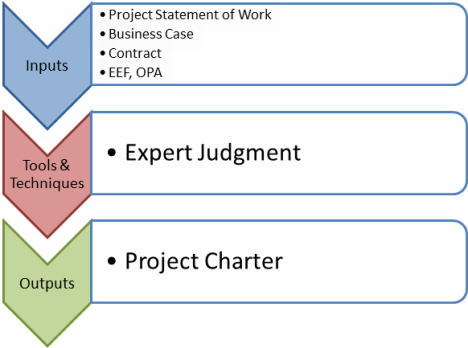
4.1.1. Project Statement of Work

The Project Statement of Work, sometimes referred to as an SOW, is a description of the products or services to be delivered by the project. It relates this product or service to both the business need for the product, and aligns the project with the strategic plan of the organization.

4.1.2 Business Case

There should be some sort of demand for the product or service, a demand that might be created by one or more of the following factors:

  • Market demand
  • Organizational need
  • Customer request
  • Technological advance
  • Legal or regulatory requirement
  • Social need

4.1.3 Contract

If the organization is to produce a product for an external customer, than a sample contract is an input to this process.

4.1.4 EEF

  • Government or industry standards
  • Organizational infrastructure
  • Marketplace conditions (see input 4.1.2 Business Case)

4.1.5 OPA

  • Organizational standard processes, policies, and definitions
  • Templates (for project charter)
  • Lessons learned database from previous projects

TOOL & TECHNIQUES

4.1.1. Expert Judgment

OUTPUTS

4.1.1 Project Charter

It makes sense that the output of the Create Project Charter process would be the Project Charter, right?

Important elements of the Project Charter include:

  • Project purpose or justification
  • Project requirements, assumptions and risks (high-level)
  • Measurable objectives
  • High-level schedule and budget summary
  • Project manager assigned to project
  • Sponsor approval

4.2 DEVELOP PROJECT MANAGEMENT PLAN

INPUTS

4.2.1 Project Charter

This input is actually the output from the previous process Develop Project Charter.

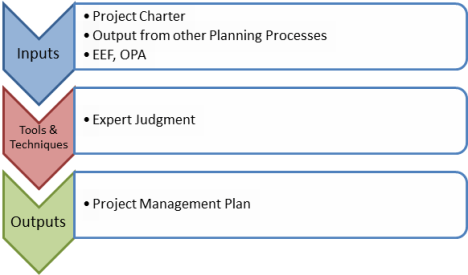
4.2.2 Output from other Planning Processes

It is important to note that this process takes all the management plans from the other Knowledge Areas and integrates it into the overall Project Management Plan. So the output from the Planning Processes becomes the input for this process.

4.2.3 EEF

Project information management tools, organization culture and infrastructure, and personnel administration (for figuring out what people are needed for project).

4.2.4 OPA

Templates from previous projects, lessons learned and other documents from previous projects, etc.

TOOLS & TECHNIQUES

4.2.1 Expert Judgment

OUTPUTS

4.2.1 Project Management Plan

Again, it makes sense that the output of the Develop Project Management Plan is, of course, the Project Management Plan. Important elements of the Project Management Plan include:

  • Project life cycle: will the project be broken up into phases for better control?
  • Determine team: who will be needed to work on the project?
  • The how to execute and control the project in order to accomplish the objectives
  • Change management (how will changes to the project be managed?), and configuration management plans (how will changes to the product be managed)?
  • Performance baseline (scope baseline, cost baseline, schedule baseline)

4.3 DIRECT AND MANAGE PROJECT EXECUTION


INPUTS

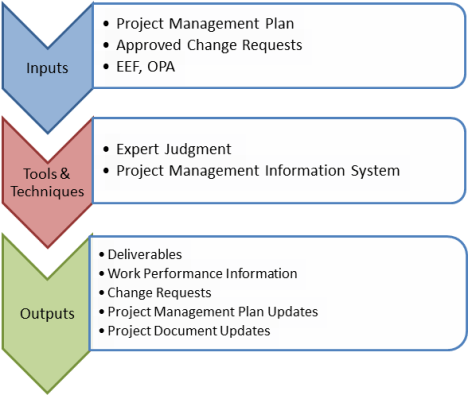
4.3.1 Project Management Plan

Again, note how the output to the previous process is now the input to this process.

4.3.2 Approved Change Requests

Perform Integrated Change Control (process 4.5) is where requests for changes are approved or rejected. If the output of that process is that the status of the change request is “APPROVED”, then those changes are inputs to work on the project as represented by this particular process, Direct and Manage Project Work.

The diagram below should illustrate this relationship.

4.3.3 EEF

In addition to the usual suspects under EEF (company culture, project management information system), an interesting item for this process in particular is

  • Stakeholder risk tolerances

This helps in planning how to direct and manage the project work within the risk tolerances specified by the stakeholders.

4.3.4 OPA

Process measurement database from previous projects is particularly helpful here so that measurable data on the processes can be developed.

TOOLS & TECHNIQUES

4.3.1 Expert Judgment

4.3.2 Project Management Information System

OUTPUTS
4.3.1 Deliverables

Of course, the whole purpose of project execution is to execute the work as specified in the plan in order to produce the product, service or result, also known as the deliverable.

4.3.2 Work Performance Information

This is information on the status of the deliverable, plus information on the costs incurred (AC or actual costs) as well as the schedule progress (which is obtained by comparing the PV or planned value to the EV or earned value).

4.3.3 Change Requests

If during the course of executing the project, issues develop that require a change to the scope, budget, or schedule, or quality, then change requests are developed. Note that the change requests are made in the Executing Progress Group, but are evaluated and either accepted or rejected as part of the Monitoring & Controlling Progress Group. If they are accepted, these changes get fed into the Executing Progress Group once again.

4.3.4 Project Management Plan Updates

During the course of the execution of the project, the project management plan may needs to be updated.

4.3.5 Project Document Updates

Issue logs, risk registers, and stakeholder registers may need to be updated during the course of execution of the project.

The next post will cover the Inputs & Outputs to processes 4.4 through 4.6 in the Integration Knowledge Area.

The Reunion Reloaded


Homewood is a suburb of Chicago, Illinois where I grew up and went to high school with around 1,000 people in our class of 1975 at Homewood-Flossmoor (HF) High School.  I was invited back in mid-April to go to a regional “mini-reunion” for those HF graduates from our class who happen to live in the Southern California area. The reunion was suggested by one of my classmates, Scott Tomlinson, who was taking advantage of a business trip to San Diego to do an all-points call for a get together. He made it along with Marty Leonard and Richard Carroll.  At that reunion, I  got to meet Scott’s son Erik who is stationed there as a Marine.

We had such a good time that Scott suggested that we do it again in August. Well, this time Marty couldn’t make it, but Mike Bentivenga said he would be able to join us this time. We met at a restaurant called Wind & Sea that is literally right at the edge of the harbor at Dana Point.  Traffic was the usual weekend crawl down on the I-5.  I was impatient to get there, not just because I was excited to see everybody again, but because of my half-German, half-Irish background, I’m one of those guys who likes to make it to a pub or to a party on time.

I pulled in half an hour late, and Mike about half an hour after that. But after enduring an hour and a half of highway hell, we spent the next three hours in reminiscing heaven. Mike was the same outgoing guy I remembered from way back when, and I remarked to myself that our outside appearance had changed, but the spark of personality behind each of those slightly older faces seemed ageless, like we were talking about events from last week rather than from 35 years ago or more. That was the same thing I experienced last time when I saw Scott, Marty and Rich 4 months ago. (You can read the account of that reunion in my previous post https://4squareviews.com/2012/04/22/translucent/.)

I thought it was interesting that the experiences we’ve had since high school have been diverse, but our individual waves of successes and setbacks have been hit by the same tidal waves of major events: the dot-com bust, 9/11, the 2008 financial meltdown, and now the changing climate. But I think we must be a pretty resilient bunch, because I’m still basically optimistic despite the overall economic situation our country is in right now.

At this reunion, it was not Scott, but Rich who introduced his son Austin to the rest of us. He’s an avid scouter, and I was afraid that our tales of wild exploits from our high school days would give him some wild ideas. “We’re just telling you these stories to let you know what not to do when you get to be our age,” I tried to tell him, albeit unconvincingly. Scott, Mike and I all recounted the first time we got ill from too much alcohol, and found that we all had the experience of not being able to drink that particular type of alcohol with enjoyment when we grew up because “our bodies still remembered,” as Scott put it.

Another interesting parallel I found was that Mike related that since he is quite an extroverted, A-type personality, he has had to develop a “laid back” persona in order to be able to communicate with people better (especially out here in California) for those who find his regular “switched-on” self a little too intimidating. I realized that I had been doing the reverse. I felt in high school that I was introverted and not leadership material because I was a little too laid back and not forward enough with people. So through my leadership training at Toastmasters, I’ve gone from being a regular member to the Assistant Area governor in a year and a half. I’ve had to develop an “extroverted” persona for the same reason that Mike developed his persona—to be able to communicate with people better. It was interesting to see the parallel between Mike’s case and mine.

Overall, I have to say that having been to the reunion back in April had quite a salutary effect on me. There is something that Carl Jung referred to as the “shadow”, or the embodiment of energies that one has denied in life for one reason or the other. These can be positive or negative energies depending on the reason for the denial. When I looked back at my life after our reunion in April, I realized there were a lot of things I enjoyed doing back in high school that I don’t do any more, like being part of a chorus. I realized that was a whole dimension of my talents and experience that I had left buried after I left college. I bought some CDs of various Broadway hits and started singing along to them. In May, I was approached by someone at a networking event who asked me if I sang, and I said, “well, I used to.” He invited me to a men’s chorus called the Masters of Harmony, and I decided to visit one of their rehearsals. Man, I was hooked! They sounded great, and it reminded me so much of the rehearsals that Walter Rodby, our choral director at HF High School, used to put us through. I went for about a month, and did the preliminary audition in June—and passed with flying colors.

This coming Wednesday I have the second audition (out of a total of four) for which I’ve been practicing about two months, and I hope I pass it as well. I realized on Saturday night that I never would have had the guts to go after this kind of experience if I hadn’t been shocked into “reclaiming territory” of the past inside of my head because of the first reunion.

Well, it was a wonderful three hours, but Scott had to get back because he wanted to have a chance to see his son in San Diego one more time before he was to fly out the next day back to Houston. I asked him about what motivated Erik to join the Marines and he mentioned there was a straight line from 9/11 which happened when he was in 5th grade to his decision later on in life to be a Marine.

On driving home along the Pacific Coast Highway back home after our reunion, I thought of that decision and I suddenly realized that I would do a speech on 9/11 about my experience on that date, and how it has shaped my later life. It was sparked by my hearing the tune “Try to Remember”, connecting it with 9/11 because of the lyrics “Try to remember the kind of September, When life was slow and oh, so mellow”, and then connecting that with Scott’s story about his son.   I’m always so full of energy and ideas after I meet with my classmates!

I’m very glad I went to the second reunion.  I not only reunited with three great guys from the past, but I also reunited with my bolder self from long ago that is now renewing my present life with more and more energy.   I hope to meet more and more of my fellow classmates in the months and years ahead.

Thanks again, Scott—you don’t know what you’ve started!

Passing the #PMP Exam: Tools & Techniques—Integration Knowledge Area


1. Introduction

In this next series of posts, we move onto step 5, which is memorizing the TOOLS & TECHNIQUES associated with each process. In order to breakdown the memorizing into more bite-size chunks, I am going to break down this topic into at least 9 posts, one for each knowledge area. (There may be some knowledge areas that require more than one post.)

 This post covers chapter 4 of the PMBOK® Guide, which covers the Integration Knowledge Area. This knowledge area contains 6 processes, with at least one process in each of the 5 process groups, with Monitoring & Controlling Process having two processes from this area.


Process
Number & Name
Process Description Tools & Techniques
4.1 Develop Project Charter Develops document that formally authorizes project and documents stakeholder needs & expectations


1. Expert judgment
4.2 Develop Project Management Plan Documents integration of all subsidiary plans (from all knowledge areas); project management plan is primary source on how to manage project across all PM process groups


1. Expert judgment
4.3 Direct and Manage Project Execution Performing work defined in project management plan 1. Expert judgment

2. Project management information system


4.4 Monitor and Control Project Work Tracking progress to meet performance objectives defined in project management plan


1. Expert judgment
4.5 Perform Integrated Change Control Reviewing change requests and managing changes to deliverables or to project management plan itself.


1. Expert judgment

2. Change control meetings

4.6 Close Project or Phase Finalizes project across all PM process groups; formally closes project 1. Expert judgment

Let’s take a look at the tools & techniques for the processes in the Integration Knowledge Area. You’ll notice that each of them have the same tool & technique in common: Expert Judgment, with process 4.3 Direct and Manage Project Execution having the additional tool & technique of 4.3.2 Project management information system, and 4.5 Perform Integrated Change Control having an additional tool & technique of Change control meetings.    You need experts or those with expertise in each area because the integration of all other processes from the various other knowledge areas is such a crucial part of project management

4.1 DEVELOP PROJECT CHARTER

4.1.1 Expert judgment

Just remember that who an “expert” is depends on what you need that person for. Obviously to develop a project charter, the person who is expert developing a high-level list of requirements, objectives, and risks of the project would include:

  • Stakeholders (including customers or sponsors)
  • Project management office
  • Consultants and subject matter experts.

Some of this expertise is directed towards technical details (product description, project objectives), and some towards management of the project (project risks and milestone schedule).

4.2 DEVELOP PROJECT MANAGEMENT PLAN

4.2.1 Expert judgment

Here the expertise sought needs to be directed towards planning of the project work, including the resources required to get the project done, the project management plan itself, and the overall change control process.

4.3 DIRECT AND MANAGE PROJECT EXECUTION

4.3.1 Expert judgment

Here the expertise sought needs to be directed towards directing and managing the execution of the project. This will include stakeholders (including customers and sponsors), consultants used on the project, and project team members, especially those who have worked on a similar project before.

4.3.2 Project Management Information System

The software used such as Microsoft Project or Primavera, is a tool used to help with scheduling, configuration management (part of 4.5 Perform Integrated Change Control) and other activities that are part of the 4.3 Direct and Manage Project Execution process.

4.4 MONITOR AND CONTROL PROJECT WORK

4.4.1 Expert judgment

The information obtained by the process Monitor and Control Project Work is interpreted by those with expertise in measuring actual project performance against the performance baseline.

4.5 PERFORM INTEGRATED CHANGE CONTROL

4.5.1 Expert judgment

For a change control board, not only the project management team, but stakeholders including the customers may be asked to participate.

4.5.2 Change control meetings

The change control board has meetings to review any change requests that are pending in order to formally approve or reject them. The decisions are documented and communicated to all stakeholders.

4.5 CLOSE PROJECT OR PHASE

4.1.1 Expert judgment

Those with expertise in closing a project need to oversee this process so that all closure processes are completed to the standards set by the organization.

This concludes the Tools & Techniques section of memorizing the processes.

The next series of posts will conclude with a discussion of the inputs and outputs for the 42 processes. This will be most easily done if we follow the same format and divide the processes by knowledge area.

Passing the #PMP Exam: Tools & Techniques—Procurement Knowledge Area (Part 2)


 1. Introduction

In this next series of posts, we move onto step 5, which is memorizing the TOOLS & TECHNIQUES associated with each process. In order to breakdown the memorizing into more bite-size chunks, I am going to break down this topic into at least 9 posts, one for each knowledge area. (There may be some knowledge areas that require more than one post.)

 This post covers chapter 12 of the PMBOK® Guide, which covers the Procurements Knowledge Area. This knowledge area contains 4 processes, one in each of the 5 process groups except for the Initiating Process Group.


I am splitting the discussion of the Tools & Techniques into two different posts. This post will cover the tools & techniques in the last two of these four processes, 12.3 and 12.4.

Process
Number & Name
Process Description Tools & Techniques
12.1 Plan Procurements Project purchasing decisions, identifying potential sellers. 1. Make-or-buy analysis

2. Expert judgment

3. Contract types


12.2 Conduct Procurements Selecting a seller through bids or proposals, awarding a contract. 1. Bidder conferences

2. Proposal evaluation techniques

3. Independent estimates

4. Expert judgment

5. Advertising

6. Internet search

7. Procurements negotiations


12.3 Administer Procurements Managing procurement relationships, monitoring contract performance, making changes as needed. 1. Contract change control system

2. Procurement performance reviews

3. Inspections and audits

4. Performance reporting

5. Payment systems

6. Claims administration

7. Records management system


12.4 Close Procurements Verification that deliverables are acceptable, formal closure of contract. 1. Procurement audits

2. Negotiated settlements

3. Records management system

Let’s take a look at the tools & techniques for the processes 12.1 and 12.2 in the Procurements Knowledge Area.

12.3 ADMINISTER PROCUREMENTS

12.3.1. Contract change control system

There is an integrated change control system which handles changes to the project which regards to the work done by the company itself; one portion of this system is a contract change control system which handles changes to the project which regards to the work done by subcontractors or sellers.

12.3.2. Procurement performance reviews

The regular project team has periodic performance reviews that monitor their performance in producing deliverables according to the project scope within cost and on schedule. Similarly, there are procurement performance reviews which monitor the contractors performance in producing deliverables, but in this case according to the contract.

12.3.3. Inspections and audits

As part of the procurement contract, periodic inspections and audits can be held to make sure that the seller is complying with the terms of the contract. The inspections and audits may include personnel from the buyer if this is allowed by the contract.

12.3.4. Performance reporting

This is essentially reporting the results of the procurement performance reviews (12.3.2) to management.

12.3.5. Payment systems

Payment to the seller must be made in strict accordance with the terms of the contract, usually after certification by the buyer that the work done by the seller has been completed satisfactorily.

12.3.6. Claims administration

As a result of the contract change control system (12.3.1), there may be occasions when the buyer and seller cannot agree on changes to be made, or on the amount of compensation to be paid for that change. Many contracts call for settlement of all disputed claims such as these through something called alternative dispute resolution (ADR) to avoid the necessity of litigation.

12.3.7. Records management system

This has to do with the managing of records relating to the procurement process itself and any contract made with the seller as part of that process.

12.4 CLOSE PROCUREMENTS

12.4.1. Procurements audits

This is a review of the processes 12.1 (Plan Procurements), 12.2 (Conduct Procurements), and 12.3 (Administer Procurements). This is to help with lessons learned on the project to help future projects in the company with their procurements processes.

12.4.2. Negotiated settlements

If there is a disputed claim by either buyer or seller (12.3.6) relating to alleged failure of the other party to comply with the terms of the contract, then there should be an attempt to a) directly negotiate a settlement, or b) participate in an alternative dispute resolution or ADR. If that fails, then litigation is the last option.

12.4.3. Records management system

This has to do with the managing of records relating to the procurement process itself and any contract made with the seller as part of that process. As part of the closing process, it means indexing and archiving these records for use by other projects.

Well, we’ve now gone through each of the individual knowledge areas except one: Integration. And that’s because, as I mentioned at the beginning of this series of posts on Tools & Techniques, the Integration processes actually ties together all of the processes in the other knowledge areas (hence its name). So that is why I am covering the Integration Knowledge Area from chapter 4 of the PMBOK® Guide in the last few posts of this series.

Passing the #PMP Exam: Tools & Techniques—Procurement Knowledge Area (Part 1)


 1. Introduction

In this next series of posts, we move onto step 5, which is memorizing the TOOLS & TECHNIQUES associated with each process. In order to breakdown the memorizing into more bite-size chunks, I am going to break down this topic into at least 9 posts, one for each knowledge area. (There may be some knowledge areas that require more than one post.)

 This post covers chapter 12 of the PMBOK® Guide, which covers the Procurements Knowledge Area. This knowledge area contains 4 processes, one in each of the 5 process groups except for the Initiating Process Group.


I am splitting the discussion of the Tools & Techniques into two different posts. This post will cover the tools & techniques in the first two of these four processes, 12.1 and 12.2

Process
Number & Name
Process Description Tools & Techniques
12.1 Plan Procurements Project purchasing decisions, identifying potential sellers. 1. Make-or-buy analysis

2. Expert judgment

3. Contract types


12.2 Conduct Procurements Selecting a seller through bids or proposals, awarding a contract. 1. Bidder conferences

2. Proposal evaluation techniques

3. Independent estimates

4. Expert judgment

5. Advertising

6. Internet search

7. Procurement negotiations


12.3 Administer Procurements Managing procurement relationships, monitoring contract performance, making changes as needed. 1. Contract change control system

2. Procurement performance reviews

3. Inspections and audits

4. Performance reporting

5. Payment systems

6. Claims administration

7. Records management system


12.4 Close Procurements Verification that deliverables are acceptable, formal closure of contract. 1. Procurement audits

2. Negotiated settlements

3. Records management system

Let’s take a look at the tools & techniques for the processes 12.1 and 12.2 in the Procurements Knowledge Area.

12.1 PLAN PROCUREMENTS

12.1.1. Make-or-buy analysis

This is the technique used to determine whether work should be done in-house or whether it must be contracted out or purchased from outside the company.

In making this analysis, it is important to consider indirect costs. If you purchase software, you must consider the cost of the ongoing support of that software (indirect cost), and not just the direct cost of its initial purchase.

This is a crucial juncture in the project, because if there are NO procurements whatsoever, and all the work is done in-house, then there will be no processes 12.2 through 12.4. They are processes that are optional depending on the results of this analysis done early on in the project.

12.1.2. Expert judgment

There are two types of expert judgment used here. One is expert technical judgment used to develop the technical criteria for evaluating the various proposals that come back from the sellers in the next process 12.2 Conduct Procurements. The other is expert legal judgment in the crafting of the legal terms and conditions that go into the procurement contracts.

12.1.3. Contract types

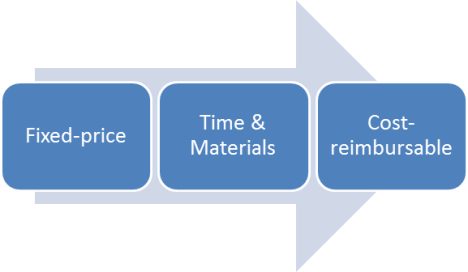
There are two general types of contacts, the fixed-price contract or the cost-reimbursable contracts. The former has a greater risk for the seller, and the latter has a greater risk for the buyer.. There is a third type of contract which is a hybrid of these two types called the time and materials contract. Here’s a comparison of these types, with the arrow to the right indicating increasing risk to the buyer:

The fixed-price contract sets a total fixed price for the product or service provided by the seller. If the product or service costs more than what the seller originally bid for, then that cost is borne by the seller. That’s why it is more advantageous to the buyer. For that reason, it is the preferred type of contract for the buyer to propose.

The cost-reimbursable contract pays the seller for all legitimate costs incurred for the product or service provided. If the product or service costs more than what the seller originally estimated, then that cost is borne by the buyer. That’s why it is more advantageous to the seller. For that reason, using the cost-reimbursable form of contract would have to require some justification for its use. It may be justified whenever the scope of work is not precisely defined at the start and needs to be altered, thus requiring many changes on the part of the seller. Another reason for justification is if there is a high risk in producing the product or service, and the seller requires this form of contract in order to compensate it for essentially being transferred this risk.

Time & materials contracts may be left open-ended and subject to a cost increase by the seller, but with certain cap or not-to-exceed value to prevent unlimited cost increases. Another form of time & materials contracts can resemble fixed unit-price arrangements for labor or material rates. The unit-labor price is fixed as in a fixed-price contract, but the number of units is left open like a cost-reimbursable contract. This kind of contract is often used with acquisition of experts or support for product team activities when the precise statement of work cannot be easily described at the beginning of the project.

12.2 CONDUCT PROCUREMENTS

12.2.1. Bidder conferences

The buyer and prospective sellers meet prior to their submittal of a bid or proposal. This ensures that all prospective sellers have a clear and common understanding of the technical and legal requirements of the procurement.

12.2.2. Proposal evaluation techniques

With procurements that are more complex, criteria are set up to evaluate the responses that will come from the sellers. An evaluation committee makes their selection of the seller based on the criteria that are set up in this tool & technique.

12.2.3. Independent estimates

In order to estimate the costs of the procurement, an independent estimate can be obtained from the buyer by an outside professional estimator or it can have the estimate done in-house. If the cost estimates from the sellers come in that are significantly different from this estimate, this may indicate that the sellers did not gain a clear enough understanding of the procurement at the bidder conference (tool & technique 12.2.1).

12.2.4. Expert judgment

A review team with experience in the areas covered by the procurement documents and proposed contract can be used to evaluate the proposals. This can include functional disciplines that are technical, financial, and/or legal in nature.

12.2.5. Advertising

Advertisements can be put in newspapers or selected trade publications to elicit bids for contracts. Government contracts require public advertising of pending government contracts.

12.2.6. Internet search

Some standard components or off-the-shelf items may be procured at a fixed price on the Internet. However, this will not work for non-standard components that have to be specially made for the project.

12.2.7 Procurement negotiations

The buyer and seller must negotiate the terms of the procurement contract. Obviously the price and overall schedule must be agreed to in advance, but also those subjects need to be covered that will affect the administration of the procurement as well, such as reporting responsibilities, and the authority to make changes to the product.

The next post will be on the Tools & Techniques associated with the last two processes 12.3 and 12.4 from chapter 12 of the PMBOK® Guide covering the Procurements Knowledge Area.

Passing the #PMP Exam: Tools & Techniques—Risk Knowledge Area (part 2)


 1. Introduction

In this next series of posts, we move onto step 5, which is memorizing the TOOLS & TECHNIQUES associated with each process. In order to breakdown the memorizing into more bite-size chunks, I am going to break down this topic into at least 9 posts, one for each knowledge area. (There may be some knowledge areas that require more than one post.)

This post covers chapter 11 of the PMBOK® Guide, which covers the Risk Knowledge Area. This knowledge area contains 6 processes, 5 of which are in the Planning Process Group and the last of which is in the Monitoring & Controlling Process Group.

Since there are 6 processes, most of which contain multiple Tools & Techniques, I am splitting the discussion of the Tools & Techniques into two different posts. This post will cover processes 11.4 through 11.6.

Process
Number & Name
Process Description Tools & Techniques
11.1 Plan Risk Management Defining how to conduct risk management activities for a project.


1. Planning meetings and analysis
11.2 Identify Risks Determining which risks may affect the project objectives and documenting their characteristics. 1. Documentation reviews

2. Information gathering interviews.

3. Checklist analysis

4. Assumptions analysis

5. Diagramming techniques

6. SWOT analysis

7. Expert judgment


11.3 Perform Qualitative Risk Analysis Prioritizing risks for further analysis by assessing likelihood & impact. 1. Risk probability and impact assessment

2. Probability and impact matrix

3. Risk data quality assessment

4. Risk categorization

5. Risk urgency assessment

6. Expert judgment


11.4 Perform Quantitative Risk Analysis Numerically analyzing the effect of risks on project objectives. 1. Data gathering and representation techniques

2. Quantitative risk analysis and modeling techniques

3. Expert judgment


11.5 Plan Risk Responses Developing options and actions to enhance opportunities and reduce risk. 1. Strategies for negative risks or threats

2. Strategies for positive risks or opportunities

3. Contingent response strategies

4. Expert judgment


11.6 Monitor and Control Risks Tracking identified risks, implementing risk response plans if risks occur, and evaluating risk process effectiveness. 1. Risk reassessment

2. Risk audits

3. Variance and trend analysis

4. Technical performance measurement

5. Reserve analysis

6. Status meetings

Let’s take a look at the tools & techniques for the processes 11.4 through 11.6 in the Risk Knowledge Area.

11.4 PERFORM QUANTITATIVE RISK ANALYSIS

The previous process did a qualitative risk analysis, identifying risks and then ranking them with regards to their probability and/or impact. In this process, a quantitative risk analysis is done to estimate the cost impact of these risks on the project.

11.4.1. Data gathering and representation techniques

One source of information on the impact of risks on a project is historical experience on previous projects. This information can be obtained through interviewing those participants on previous projects.

Another source of information is probability distributions, which can assist in obtaining an estimate of the most likely risk outcome, as well as the pessimistic and optimistic estimates.

11.4.2. Quantitative risk analysis and modeling techniques

Sensitivity analysis takes one uncertain element that may affect a project and examines how changes in this element would affect the project, with all other uncertain elements being held at their normal, baseline value. This shows the variation associated with each uncertain element. Sometimes these variations are put into something called a tornado diagram, which is simply a bar chart with the elements listed in a vertical manner so that the element with the largest variation is on top, followed by the next-largest, and so on, tapering down to the smallest variation on the bottom. (The name of the diagram comes from the upper-tapering profile of the bars in the chart, similar to the profile of a tornado.)

Expected monetary value analysis is a way of taking probabilities of certain risks happening and quantifying their impact on the project. For example, let’s say that at a certain point in the project, there are two possible outcomes. One, outcome A, has a probability of 25% and costs $100K, whereas outcome B has a probability of 75% and costs 75K. Then the EMV is equal to the sum of the products of the probability of each occurrence times its monetary value. In this case, the EMV = (25% x $100,000) + (75% x $75,000) = $25,000 + $25,000 = $50,000.

Modeling through Monte Carlo analysis is a way of doing a calculation using various combinations of probabilities of outcomes for the various risks that impact a project. It can generate a cost estimate of the overall project doing a cost estimate similar to the monetary value analysis described in the last paragraph, or for estimating the impact of risks on a schedule, can is an analysis that would generate an estimate of the duration of a project.

11.4.3. Expert judgment

As usual, asking those who have worked on a similar project before, either within the organization (team members) or outside the organization (subject matter experts).

11.5 PLAN RISK RESPONSES

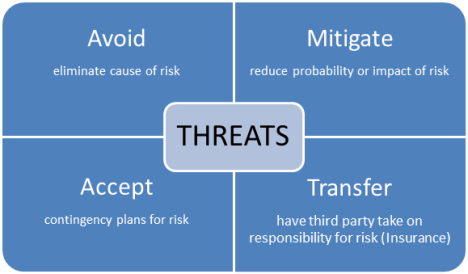
11.5.1. Strategies for negative risks or threats

As can be seen, if the risk is low, you can simply accept it. However, if the risk is moderate, you may try to mitigate or transfer the risk. If the risk is high, you may try to simply avoid it altogether.

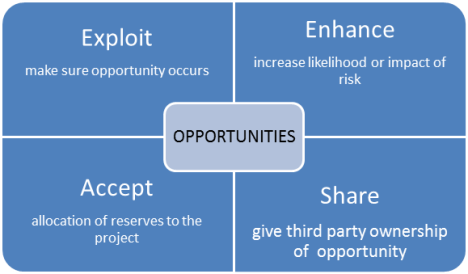
11.5.2. Strategies for positive risks or opportunities

As can be seen, if the opportunity is a good one, you should try to exploit it. If it is of lesser probability, you can either enhance it or share it. If the probability is low, you can essentially accept it, and if it does occur, you can allocate the unused reserve to the project.

11.5.3. Contingent response strategies

This is a list of responses to be used if certain risks occur. Therefore a list of events that trigger these contingency responses needs to be created and tracked through the course of the project. If the events end up not occurring, then the reserves to be used for the contingency responses should be returned to the budget.

11.5.4. Expert judgment

Those who have worked on similar projects before, either within the organization (team members) or outside the organization (consultants) can assist in creating a set of appropriate risk responses.

11.6 MONITOR AND CONTROL RISKS

11.6.1. Risk reassessment

New risks are identified, current risks are reassessed as to their probability and impact, and risks that are outdated are closed (risk reserves returned to the budget).

11.6.2. Risk audits

This is an audit of the effectiveness of risk responses to make sure they are updated to reflect the new risks and current risks that were reassessed in the tool & technique mentioned in the previous paragraph.

11.6.3. Variance and trend analysis

Variance and trend analysis can reveal deviation from the baseline, which in turn may indicate the potential impact of threats or opportunities.

11.6.4. Technical performance measurement

This compares technical accomplishments such as number of defects, etc., that may help forecast the degree of technical risk faced by the project.

11.6.5. Reserve analysis

When risks occur, they have positive or negative impacts on the budget or schedule, and these are added to or subtracted from the contingency reserves. Reserve analysis compares the amount of the contingency reserves remaining to the amount of risk remaining in order to determine whether the amount of reserves is adequate.

11.6.6. Status meetings

Periodic status meetings are places where periodic risk management should take place. It is frequent discussions in a group that makes it more likely that risks and opportunities will be properly identified.

The next post will be on the Tools & Techniques associated with chapter 12 of the PMBOK® Guide covering the Procurements Knowledge Area.

Passing the #PMP Exam: Tools & Techniques—Risk Knowledge Area (Part 1)


 1. Introduction

In this next series of posts, we move onto step 5, which is memorizing the TOOLS & TECHNIQUES associated with each process. In order to breakdown the memorizing into more bite-size chunks, I am going to break down this topic into at least 9 posts, one for each knowledge area. (There may be some knowledge areas that require more than one post.)

This post covers chapter 11 of the PMBOK® Guide, which covers the Risk Knowledge Area. This knowledge area contains 6 processes, 5 of which are in the Planning Process Group and the last of which is in the Monitoring & Controlling Process Group.


Here’s a description of the four processes that are included in the Human Resources Knowledge Area, together with a listing of the Tools & Techniques used in those processes. Since there are 6 processes, most of which contain multiple Tools & Techniques, I am splitting the discussion of the Tools & Techniques into two different posts. This post will cover processes 11.1 through 11.3.

Process
Number & Name
Process Description Tools & Techniques
11.1 Plan Risk Management Defining how to conduct risk management activities for a project.


1. Planning meetings and analysis
11.2 Identify Risks Determining which risks may affect the project objectives and documenting their characteristics. 1. Documentation reviews

2. Information gathering interviews.

3. Checklist analysis

4. Assumptions analysis

5. Diagramming techniques

6. SWOT analysis

7. Expert judgment


11.3 Perform Qualitative Risk Analysis Prioritizing risks for further analysis by assessing likelihood & impact. 1. Risk probability and impact assessment

2. Probability and impact matrix

3. Risk data quality assessment

4. Risk categorization

5. Risk urgency assessment

6. Expert judgment


11.4 Perform Quantitative Risk Analysis Numerically analyzing the effect of risks on project objectives. 1. Data gathering and representation techniques

2. Quantitative risk analysis and modeling techniques

3. Expert judgment


11.5 Plan Risk Responses Developing options and actions to enhance opportunities and reduce risk. 1. Strategies for negative risks or threats

2. Strategies for positive risks or opportunities

3. Contingent response strategies

4. Expert judgment


11.6 Monitor and Control Risks Tracking identified risks, implementing risk response plans if risks occur, and evaluating risk process effectiveness. 1. Risk reassessment

2. Risk audits

3. Variance and trend analysis

4. Technical performance measurement

5. Reserve analysis

6. Status meetings

Let’s take a look at the tools & techniques for the processes 11.1 through 11.6 in the Risk Knowledge Area.

11.1 PLAN RISK MANAGEMENT

11.1. Planning meetings and analysis

The project manager meets with selected project team members and stakeholders in order to do high-level planning regarding the following

  • Risk management activities are developed to be included in the project schedule
  • The cost of these risk management activities are estimated to be included in the project budget
  • Risk management responsibilities are assigned
  • General organizational templates for categorizing risk are tailored for the specific project.

The results of these discussions are included in the risk management plan.

11.2 IDENTIFY RISKS

11.2.1. Documentation reviews

Risks are identified by reviewing documents which contain the project requirements and assumptions.

11.2.2. Information gathering interviews

A risk breakdown structure is a mapping of risks associated with the activities in the work breakdown structure. To generate this there are many techniques, some of which are:

Technique

Description

1. Brainstorming Risk breakdown structure is generated by a facilitator of a group.
2. Delphi technique This is technique where experts are sent surveys and their responses are combined and analyzed to create a consensus.
3. Interviewing Team members, stakeholders, and subject matter experts are interviews.
4. Root cause analysis This identifies a problem, and discovers the underlying causes that lead to it. This allows one to

11.2.3. Checklist analysis

One way to create a risk breakdown structure is to use a checklist based on historical information about similar projects that have been done in the past.

11.2.4. Assumptions analysis

The assumptions about the project are analyzed to identify risks to the project from the incompleteness or inaccurate about the assumptions. This contrasts with the first tool & technique 11.2.1 where the risks are analyzed on the assumptions ARE correct. This tool & technique therefore is a deeper level of analysis of risk.

11.2.5. Diagramming techniques

These techniques are used for determining the causes of risks.

Technique

Description

1. Cause and effect

diagrams

This is a fishbone or Ishikawa diagram, which identifies causes of risks.
2. Flowchart

diagrams

This takes processes and breaks them down in a flowchart format, so that the cause of a problem can be isolated.
3. Influence diagrams These diagrams show the causal relationships between situations, thus making it easier to trace the causes of risks.

11.2.6. SWOT analysis

The Strengths and Weaknesses (internal to the organization) and the Opportunities and Threats (external to the organization) are identified. These represent events to be avoided and/or encouraged in the course of the project.

11.2.7. Expert judgment

One way to identify risks is to discuss those with experience on similar projects, either within the organization or subject matter experts (consultants).

11.3 PERFORM QUALITATIVE RISK ANALYSIS

11.3.1. Risk probability and impact assessment

Each risk is investigated as to its a) likelihood of occurring and b) impact on the project if it occurs.

11.3.2. Probability and impact matrix

Based on the risk probability and impact assessment done in the last tool & technique, the

risks can be ranked into levels of overall risk such as low, moderate, or high.

11.3.3. Risk data quality assessment

This is an analysis not of the risks themselves, but of the risk data’s reliability. This is a second-order analysis which helps the project manager decide whether it is necessary to gather higher-quality data on the risks.

11.3.4. Risk categorization

Risks are categorized based on the area of the project most exposed to the effects of uncertainty. Grouping risks together in categories related to common root causes can help lead to a more effective risk response than dealing with them on a case-by-case basis.

11.3.5. Risk urgency assessment

The urgency of a risk is based on those that need to be addressed in the near-term, that is, closer to the beginning of a project. Another factor that can be included in the priority of a risk is the time and cost it would take to respond to such a risk. The results of this risk urgency assessment can be combined with the risk ranking (based on tool & technique 11.3.2 Probability and impact matrix) to get the final risk severity rating.

11.3.6. Expert judgment

One way to categorize and/or rank risks is to discuss them with those that have experience on similar projects, either within the organization or subject matter experts (consultants).

The next post will be on the Tools & Techniques associated with the last three processes of the Risk Knowledge Area.