6th Edition PMBOK® Guide–Project Business Case


I am starting a project of going through the 6th Edition of the PMBOK® Guide and blogging about its contents.    The 6th Edition was released on September 22nd by the Project Management Institute, and the first chapter is a general introduction to the framework in which project management exists, starting with section 1.2 Foundation Elements (section 1.1 describes the purpose of the Guide).

The section I am going over in this blog post is section 1.2.6 Project Management Business Documents.   These are two documents which are inputs into the first project management process 4.1 Project Charter.   If these are inputs into the first project management process that are created even before the project is initiated, then where do they come from?   They are actually outputs of Business Analysis, and so they are essentially the intersection between Business Analysis and Project Management.

The two project management business documents are:

  • Project business case–this is an economic feasibility study which demonstrates the benefits or business value to be created as a result of the project
  • Project benefits management plan–describes how the benefits created as a result of the project will be maintained after the project is done

The project business case should be a familiar document to PMPs, because it was  described back in the previous edition of the PMBOK® Guide.   However, the document that is new for the 6th Edition of the Guide is the project benefits management plan.   In this post I will cover the project business case.
021413_0424_2.png

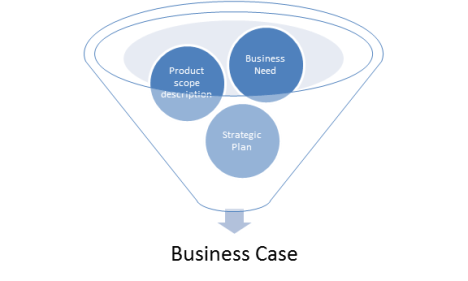
Here are the main elements of the business case.

  • Product scope description–There is a description of the product, service, or result that is being proposed to be produced by the project.   This answers the question “What” objective is the project going to create.
  • Business need–what is the benefit or business value that is going to be created as a result of the project.   This answers the question “Why” is the project going to create its objective–from the standpoint of the stakeholder who will receive the benefit of the project.
  • Strategic plan–what strategic goal or objective that will be achieved by doing the project?   This answers the question “Why” is the project going to create its objective–from the standpoint of the organization doing the project.

These elements are combined in the project business case document as indicated in the graphic above.   (Please note that the downward motion of the elements as they get processed together in the business case is NOT indicative of any editorial comment on my part that the project is going down the drain, or any other similar conclusion.)

It is important to distinguish the business need and the business case, because the terms are similar.   The former is the reason for the project to be done; the latter is the document that explains why it should be done.

There are additional details that can be included in the project business case, and these are listed on p. 31.   These are much more elaborate than those listed in the previous edition of the Guide, which shows the increasing importance PMI is placing on this document.

The question that the project business case answers is “what benefit or business value will be created by the project?”  However, how does an organization make sure those benefits are not as temporary as the project?   That is the purpose of the project management benefits plan, the other business document that is an input to the Develop Project Charter project, and it is the subject of the next post.


6th Edition PMBOK® Guide–Tailoring PMBOK to Your Project


I am starting a project of going through the 6th Edition of the PMBOK® Guide and blogging about its contents.    The 6th Edition was released on September 22nd by the Project Management Institute, and the first chapter is a general introduction to the framework in which project management exists, starting with section 1.2 Foundation Elements (section 1.1 describes the purpose of the Guide).

The section I am going over in this blog post is section 1.2.5 Tailoring.   After the components of a project were presented in the previous section, this short section focuses on the following simple but important truth:   not every tool, technique, input or output identified in the PMBOK® Guide is required on every project.    The PMBOK® Guide was not created in a vacuum; it is the sum total of knowledge from experience on projects that is generally recognized as good practice.

What this means in practical terms is that each organization has to decide what elements of project management from the PMBOK® Guide will be used; PMI cannot give specific recommendations for what to include.

A good analogy to explain this is to think of the PMBOK® Guide as a hardware store that is visited by people with various needs for tools.    A homeowner who wants to fix a kitchen sink is doing a project that will require a very limited range of tools and materials.   On the other hand, a building contractor who is going to remodel a kitchen is going to require a lot more extensive set of tools and materials.   The hardware store caters to all, and includes all of the tools and materials you would need on any type of project, no matter what the scope.    Similarly, the PMBOK® Guide contains tools and techniques to be used on projects with budget anywhere from a few hundred dollars to several million dollars.    It is up the person doing the project to know what tools and techniques will be needed.

This shows the importance of the project management plan, because this will describe, out of the entire arsenal of project management tools and techniques that are described in the PMBOK® Guide, which ones the organization plans to use for any given knowledge area.

Now for the test taker, the practical import of this is that, no matter what tools and techniques you have used in the past, you will have to learn the tools and techniques available in the entirety of the PMBOK® Guide, no matter whether you ever plan to use them on a project or not.    Because some day, you may need to use them, and this knowledge will become practical.

The next post will talk about project management business documents.   In reality, these documents are artifacts from the field of business analysis, which intersects with project management at the very beginning of the project.   This has been a very fruitful area of growth for PMI since the last edition of the PMBOK® Guide, so make sure to look at it!


6th Edition PMBOK® Guide–Project Management Data and Information


I am starting a project of going through the 6th Edition of the PMBOK® Guide and blogging about its contents.    The 6th Edition was released on September 22nd by the Project Management Institute, and the first chapter is a general introduction to the framework in which project management exists, starting with section 1.2 Foundation Elements (section 1.1 describes the purpose of the Guide).

The section I am going over in this blog post is section 1.2.4 Components of the Guide, although it should be titled Components of a Project (in my humble opinion).   In the section I am covering today, 1.2.4.7 Project Management Data and Information, it discusses some of the common outputs of project management processes, namely, work data, work information, and work reports.    Let’s answer some questions on these three categories.

How are they different?

Here’s how they relate to each other:   data → information → reports.   More specifically,

  • Work performance data are raw observations and measurements identified during activities that carry out the project work.   They are produced as outputs of Executing processes.   (Examples:  percent work completed, start and finish dates of schedule activities, actual costs, actual durations of activities)
  • The work performance data are then inputs into Controlling Processes, which are then analyzed and integrated based on relationships across knowledge areas to become work performance information that can be used by the project team.    They are produced as outputs of Controlling Processes of the various knowledge areas.  (Examples:   status of deliverables or change requests, earned value estimates of project status and forecasts for project completion).
  • The work performance information is input into the Overall Project Control process (4.5 Monitor and Control Project Work) in the Integration knowledge area, where it is compiled and then represented in documents called work performance reports which are then distributed not just to the project team but to stakeholders.   (Examples:  status reports, electronic dashboards, memos, recommendations.)

For more details, see Figure 1-7 Project Data, Information and Report Flow on page 27 of the Guide.

Example of data and information flow

Here’s an example.   Let’s say I am working as a project manager and I want to find out how things went on the project yesterday and then report the status to my stakeholders.  I find out how much time the project team members spent on the various activities they were supposed to do yesterday.    John worked 4 hours and Mary worked 4 hours.   Great.   This is an example of work performance data, which in this case is focused on the actual work done.

Now, I take a look at the project plan and compare the actual work done with the work that was planned to be done yesterday.    Well, John was supposed to work 4 hours on the project, so that’s okay, but Mary was supposed to work 6 hours but only worked 4 hours.  Oops!   Using earned value management, I can say that the SPI is 0.80.   The schedule performance index is derived by taking the actual hours worked (8) and dividing this number by the number of hours that were planned to be worked (10).   By using the work performance data and comparing it to the project plan, I have now created work performance information that can be used by the project team.   We not only know that we are behind schedule, but by precisely how much (2 hours).   In our project team meetings, we can then go into the reason why.   Let’s suppose it turns out that Mary’s functional manager wouldn’t let her work six hours on the project because of some urgent work she had to do for her department.    After talking to the functional manager, you find out that the urgent work is done, and she can work an extra two hours on the project tomorrow to make up for the time lost today.

You then prepare a work performance report, which informs the stakeholders that the project is behind schedule, but that the reason for this has been ascertained and the project is forecast to be on schedule again at the end of the next day.   You then promise to update them tomorrow after you make sure that this delay has been corrected.

So to recap, the work performance data takes the actuals, and compares them with the plan to produce the work performance information, and this is further analyzed and compiled into a work performance report which tells the stakeholders what they need to know:   the work is temporarily behind schedule, but corrective action is in the process of being taken.

This concludes the section 1.2.4 on Components of the Project.

The next section 1.2.5 talks about tailoring the standard for project management described in the 6th Edition of the PMBOK® Guide to fit a given project.   That will be the subject of my next post…


6th Edition PMBOK® Guide–Project Management Processes


I am starting a project of going through the 6th Edition of the PMBOK® Guide and blogging about its contents.    The 6th Edition was released on September 22nd by the Project Management Institute, and the first chapter is a general introduction to the framework in which project management exists, starting with section 1.2 Foundation Elements (section 1.1 describes the purpose of the Guide).

The section I am going over in this blog post is section 1.2.4 Components of the Guide, although it should be titled Components of a Project (in my humble opinion).    The reason is that the preceding section, 1.2.3 Relationship of Project, Program, Portfolio, and Operations Management shows the external relationship between a project and all of these other elements within an organization.   The current section 1.2.4 now shifts from an external view of a project to an internal one, and shows what its components are.  Here they are in decreasing order of magnitude:   project life cycle, project phase, process group/knowledge area, process.   In the last posts, I discussed the project life cycle, project phases, and the five process groups and ten knowledge areas that project management processes are divided into.   In this post, I will discuss the project management processes themselves:  what they consist of, how they fit together, and how to study them for the exam.

Processes–what do they consist of?

In section 1.2.4.4 on Project Management Processes, processes are defined as a series of activities that take inputs,  and utilize tools & techniques to produce outputs .   

How do they fit together?

In most cases, the outputs of one process with then become the inputs to other processes, and this is how they are connected together.

How many processes are there in project management?

There are 49 processes, which are distributed between the five process groups and ten knowledge areas.   See page 25 of the Guide for Table 1-4 which shows how they are distributed.

How do I study them for the exam?

You should take a blank sheet of paper, and draw the table on p. 25 or create your own template grid that you can print out.    If you can do it on ledger size (11 x 17) paper it will be the easiest to use, but use letter or even better yet, legal size paper to do the exercise.    You should find some index cards and put the name of the process on one side, and then on the other side put the name plus the numerical designation of the process based on the Table 1-4 on page 25.   For example, the first process in Integration is 4.1 Develop Project Charter.   You would put “Project Charter” on one side, and then “4.1 Develop Project Charter on the other.”

  • Try to memorize the position that the process would take on the grid, namely, in the Initiating Process Group under the Integration Knowledge Area.
  • Do this for all of the 7 processes in the Integration Knowledge Area, then shuffle the cards, and then looking at the side of the card with just the name of the process, try to guess where it goes.    It should only take a couple of tries, probably 5 at the most, to be able to master this knowledge area.
  • Then take the next knowledge area of Scope, memorize the location of those processes, and then combine the two sets of index cards and see if you can remember all of the locations for the two knowledge areas.
  • Keep adding knowledge areas until you have memorized the locations of all of the 49 processes in all of the knowledge areas.
  • Next:   now you have to remember the name of the processes, and do this by taking a blank card and thinking of the first process in Integration Management.    Put it on the grid and when you are done with filling in index cards and putting them on the grid, check your results with the grid on p. 25.
  • Continue this for all of the knowledge areas until you can recreate the chart within 15 minutes from scratch.

The ultimate goal should be to recreate the chart from scratch in 15 minutes because that’s how much time it takes to go through the tutorial at the beginning of the PMP exam.    You can multitask and recreate the chart in the time it takes to go through the tutorial which contains information about how to take the test, most of which is self-explanatory anyway.

As far as memorizing the inputs, tools & techniques, and outputs, it is good to study them, but trying to memorize all of those would be a monumental task, and the most important thing is not to memorize, but to understand them.   If you understand what it is that the process does, then figuring out which of 4 possible choices could be inputs for that process is a matter of logic and understanding, rather than one of memorization.

That being said, there are some patterns that show up with inputs and outputs, and I will create posts at a later time for how to deal with exam questions dealing with them.

The next post covers the topic of how data is created during a project, how it is turned into information that is usable by the project team, and how this information is packaged into reports that are usable by the stakeholders.


6th Edition PMBOK® Guide–Project Management Process Groups


I am starting a project of going through the 6th Edition of the PMBOK® Guide and blogging about its contents.    The 6th Edition was released on September 22nd by the Project Management Institute, and the first chapter is a general introduction to the framework in which project management exists, starting with section 1.2 Foundation Elements (section 1.1 describes the purpose of the Guide).

The section I am going over in this blog post is section 1.2.4 Components of the Guide, although it should be titled Components of a Project (in my humble opinion).    The reason is that the preceding section, 1.2.3 Relationship of Project, Program, Portfolio, and Operations Management shows the external relationship between a project and all of these other elements within an organization.   The current section 1.2.4 now shifts from an external view of a project to an internal one, and shows what its components are.  Here they are in decreasing order of magnitude:   project life cycle, project phase, process group/knowledge area, process.   In the last posts, I discussed the project life cycle and project phases.   In this post, I will discuss project management process groups.

The 49 processes of project management can be classified according to which of the five process groups they are in and which of the ten knowledge areas they cover.    The five process groups are:

  1. Initiating–defines the new project and obtains authorization to start it
  2. Planning–establishes the scope of the project, refines the objectives, and defines the course of action required to attain those objectives
  3. Executing–completes the work defined in the project management plan to satisfy the project requirements
  4. Monitoring and Controlling–tracks, reviews, and regulates the progress and performance of the project; identifies any areas in which changes to the plan and required and initiates those changes
  5. Closing–Formally completes or closes the project.

Although they are listed sequentially, the processes will usually start with Initiating and Planning, but then cycle forth between Executing and Monitoring and Controlling, perhaps even looping back to Planning (if there are changes made to the plan), and then when the final deliverable is completed and accepted by the customer or sponsor, the last and final process group Closing will take place.

The middle three process groups can be considered similar to the Plan-Do-Check-Act (PDCA) cycle made popular by Dr. Edwards Deming for control and continuous improvement of products and processes.    A project, being defined as a temporary endeavor, puts two bookends on this cycle and adds an Initiating and Closing process group on either side.

Although there are five process groups, the 49 processes are not distributed evenly among them.    Here’s the number of processes in each process group:

  • Initiating (2)
  • Planning (24)
  • Executing (10)
  • Monitoring and Controlling (12)
  • Closing (1)

As you can see, the Planning process groups gets the lion’s share of the processes, with 24 processes, the Monitoring and Controlling process group getting 12 processes, and the Executing process group getting 10 processes.  The two “bookends”, the Initiating and Closing process groups, have only 2 and 1 process each, respectively.

The breakdown of the number of questions on the PMP exam by process group is as follows (based on the PMP exam outline published by PMI in 2015 based on the 5th Edition PMBOK® Guide):

  • Initiating (13%)
  • Planning (24%)
  • Executing (31%)
  • Monitoring and Controlling (25%)
  • Closing (7%)

If the above proportions of questions on the PMP exam based on the 5th Edition PMBOK® Guide are indicative of the breakdown on the 6th Edition published in September 2017, then one should pay close attention to the Initiating and Closing group processes, because they will be represented by a disproportionately larger percentage of questions on the exam.

The next post covers the ten knowledge areas that the 49 processes are divided into.   In the 5th Edition, a new knowledge area was added (Stakeholder Management) that was an outgrowth of another knowledge area (Communications Management).   The good news for the PMP test taker is that in the 6th Edition, there are no new knowledge areas to learn!

6th Edition PMBOK® Guide–Project Phases


I am starting a project of going through the 6th Edition of the PMBOK® Guide and blogging about its contents.    The 6th Edition was released on September 22nd by the Project Management Institute, and the first chapter is a general introduction to the framework in which project management exists, starting with section 1.2 Foundation Elements (section 1.1 describes the purpose of the Guide).

The section I am going over in this blog post is section 1.2.4 Components of the Guide, although it should be titled Components of a Project (in my humble opinion).    The reason is that the preceding section, 1.2.3 Relationship of Project, Program, Portfolio, and Operations Management shows the external relationship between a project and all of these other elements within an organization.   The current section 1.2.4 now shifts from an external view of a project to an internal one, and shows what its components are.  Here they are in decreasing order of magnitude:   project life cycle, project phase, process group/knowledge area, process.   In the last post, I discussed the various types of project life cycle, from predictive, to iterative/incremental, to adaptive (agile).   In this post, I will discuss the next largest component, the project phase.

The formal definition of a project phase according to PMI is “a collection of logically related project activities.”   Projects are broken up into phases usually when they are very large and the amount of resources that will be expended on the project are very substantial.   A phase is like a mini-project, in that each phase goes through the five process groups of Initiating, Planning, Executing, Monitoring & Controlling, and Closing. In fact the very last of the 49 project management processes is called 4.7 Close Project or Phase for that very reason.

The reason for splitting up a project into phases is that at the end of each phase, there is a phase gate where a decision is made whether or not to go on to the next phase.   In this way, it at any phase gate, the organization decides the project is not viable, then the organization can decide to pull the plug then and there and not go on to the next phase.  This reduces the cost risk to the organization by limiting the expenditures on projects that will end up adding value for the organization in the way that they were originally envisioned.

Let’s use an example to clarify what the phases are.    I used to work for a Japanese automobile manufacturer, and before producing a new model vehicle, they would first put out a concept car.   So concept development would go first.   Then the requirements would be gathered.   Now these would include customer requirements, based in part on market studies about what kinds of cars various types of people were interested in driving.   But there would also be regulatory requirements, such as new safety regulations coming out of the NHTSA or environmental regulations coming out of the EPA.    There would be a solution development which would combine these requirements and adjust the original concept development into the design and production of a prototype, which would then be builttested, and a transition made to those in manufacturing who would then take over mass production of the new vehicle.

Each of the groups of activities listed above could be made into a separate phase, with a phase gate at the end of each one where the organization would make a decision on whether or not to the go to the next phase.    There might be some event which changed the market and no longer made the concept car viable.   In which case, the organization might cancel further development.   Or a new type of regulatory requirement might make a certain car no longer feasible and require a change in the design.   Whatever the reason, the phase gate (sometimes referred to as a phase review or stage gate) is there to ensure that the proposed product, service, or result that will come out of the project is still in alignment with the business need and strategic objective of the organization.

The next post will cover the five process groups and ten knowledge areas that the processes of a project can be divided into.

6th Edition PMBOK® Guide–Project Life Cycles


I am starting a project of going through the 6th Edition of the PMBOK® Guide and blogging about its contents.    The 6th Edition was released on September 22nd by the Project Management Institute, and the first chapter is a general introduction to the framework in which project management exists, starting with section 1.2 Foundation Elements (section 1.1 describes the purpose of the Guide).

The section I am going over in this blog post is section 1.2.4 Components of the Guide, although it should be titled Components of a Project (in my humble opinion).    The reason is that the preceding section, 1.2.3 Relationship of Project, Program, Portfolio, and Operations Management shows the external relationship between a project and all of these other elements within an organization.   The current section 1.2.4 now shifts from an external view of a project to an internal one, and shows what its components are.  Here they are in decreasing order of magnitude:   project life cycle, project phase, process group/knowledge area, process.   In this first post, I will discuss the largest component, the project life cycle.

The project life cycle is a series of phases that a project passes through from its start to its completion.    There are several types of project life cycles, from predictive, to iterative/incremental, and adaptive (agile).    They vary in terms of how the project constraints of scope, time and cost evolve during the life cycle, from the most rigid (predictive) to the most fluid (agile).

Predictive–project scope, time and cost are determined in the early phases of the life cycle.   This is also known as a “waterfall” life cycle.

Iterative–the project scope is determined in the early phases of the life cycle, but the time and cost estimates are modified as the team’s understanding of the project increases.

Incremental–the project scope is produced through a series of iterations that successively add functionality of the product.    The “spiral” model of project management is an example of this type of project life cycle.

NOTE:    Anthony Mersino, in his VitalityChicago blog, says that although PMI describes these last two project life cycles, iterative and incremental as being separate, they are often done together, so that the scope as well as the time/cost estimates are modified in a series of iterations.

Adaptive–here it is often the time and cost constraints which are determined in the early phases of the life cycle; it is the scope that continuously evolves based on interactions with the customer.

Here is a comparison of how requirements, deliverables, change, stakeholders, and risk/cost are handled in the various types of project life cycles.    (Taken from Figure X3-1. The Continuum of Project Life Cycles on page 666 of the Guide.

  Predictive Iterative

Incremental


Agile
Requirements Defined up-front Elaborated periodically  

Elaborated frequently

Deliverables Delivered at end of project Delivered periodically Delivered frequently
Change Constrained as much as possible Incorporated at periodic intervals Incorporated in real-time delivery
Stakeholders Involved at specific milestones Involved regularly Involved continuously
Risk/cost Controlled by detailed planning Controlled by progressively elaborating Controlled as requirements emerge

There is an additional type called hybrid which combines the predictive and adaptive life cycles.   The elements that are well known or have fixed requirements follow a predictive life cycle, and those that are still evolving follow an adaptive life cycle.

Although this is often hyped as the trend in which project management is going, there are many caveats to using the hybrid approach, some of which are touched upon by Anthony Mersino in his blog about agile project management called VitalityChicago.   So mix and match project life cycles at your own risk!

6th Edition PMBOK® Guide–Components of a Project


I am starting a project of going through the 6th Edition of the PMBOK® Guide and blogging about its contents.    The 6th Edition was released on September 22nd by the Project Management Institute, and the first chapter is a general introduction to the framework in which project management exists, starting with section 1.2 Foundation Elements (section 1.1 describes the purpose of the Guide).

The section I am going over in this blog post is section 1.2.4 Components of the Guide, although it should be titled Components of a Project (in my humble opinion).    The reason is that the preceding section, 1.2.3 Relationship of Project, Program, Portfolio, and Operations Management shows the external relationship between a project and all of these other elements within an organization.   The current section 1.2.4 now shifts from an external view of a project to an internal one, and shows what its components are.  Here they are in decreasing order of magnitude:

  • Project life cycle–a large project can be broken down into various phases; the entire series of phases a project passes through from its start to its completion is referred to as the project life cycle.
  • Project phase–each individual project phase is like a mini-project that goes from the first process group (Initating Processes) to the last process group (Closing Processes).  The phases are completed in sequence, and the connection between the individual phases in the project life cycle is called a phase gate, where the decision is made whether or not to go on to the next phase.
  • Project management process group–the forty-nine project management processes are grouped logically into five process groups:   Initating (2 processes), Planning (24 processes), Executing (10 processes), Monitoring & Controlling (12 processes), and Closing (1 process).   Although a project will pass sequentially through its various phases, the passage through process groups is more complicated.
  • Project management knowledge area–the processes within each process group are identified with one of the ten knowledge areas:   Integration, Scope, Schedule, Cost, Quality, Resources, Communications, Risk, Procurement, and Stakeholder.
  • Project management process–each of the 49 project management processes, which belong to one of five process groups and ten knowledge areas, consist of the following components:
    • Inputs–items which can be outputs from other processes
    • Tools and techniques–tools are items that are used with techniques to take inputs and process them into outputs
    • Outputs–deliverables to the project or items which can be inputs to subsequent processes

In order to get a visual picture of how these various components fit together, take a look at Figure 1.5 Interrelationship of the PMBOK® Guide Key Components on page 18 of the Guide.

The next few posts will discuss each of these levels of components of a project, starting with the largest level, that of the project life cycle.   There are various types of project life cycle, and these will determine if the project is being handled in a traditional or agile framework.   This is where a lot of  change between the 5th Edition and the 6th Edition, so it will be a crucial post to pay attention to!

6th Edition PMBOK® Guide–Organizational Project Management


I am starting a project of going through the 6th Edition of the PMBOK® Guide and blogging about its contents.    The 6th Edition was released on September 22nd by the Project Management Institute, and the first chapter is a general introduction to the framework in which project management exists, starting with section 1.2 Foundation Elements (section 1.1 describes the purpose of the Guide).

The section I am going over in this blog post is section 1.2.3.6 Organizational Project Management (OPM) and Strategies.    This can be considered a synthesis of sorts of the previous sections that cover

  • the relationship between projects, programs, and portfoliios
  • the relationship between projects and operations

Projects, programs, and portfolios differ in terms of depth of scope, that is, the amount of products, services, and results they create; projects and operations differ in terms of depth of time, with projects being temporary endeavors to create unique products, services and results and operations being the ongoing production of the same.

However, what ties ALL of these together is Operational Project Management or OPM, which is the organizational framework which integrates them in order to achieve overall strategic objectives.    See p. 17 of the Guide, Figure 1-4, for a diagram of this organizational framework.

How are all of these tied together in OPM?

  • Strategy–these are the organizational goals and objectives which inform the investments a company makes (e.g., increase in market share, decrease in operating expenses, or success of a new product)
  • Portfolio–selects the right programs or projects to achieve these organizational goals and objectives, prioritizes them, and then provides the needed resources to achieve them
  • Programs and projects–focuses on the achievement of the organizational goals and objectives
  • Operations–uses the results of programs and projects to realize business value or benefit, which is then utilized to further the organization’s business strategy.

For any specific project, the relationship between a project and the strategic objectives of an organization is described in the project business case, and the relationship between a project and the ongoing business value or benefit it provides to a company’s operations is described in the project benefits management plan.    (These are described in sections 1.2.6.1 and 1.2.6.2 respectively, and will be covered in later posts.)

If you want to succeed on your project, it is important that you understand the strategic objectives that went into creating your project in the first place.    If conditions change such that those objectives are no longer served by your project, or if those business objectives themselves are changed by your company, then your project may end up being cancelled by the sponsor.

But it is also important that you understand the strategic objectives behind your project so that you can inspire your project team.    Once they understand that their daily efforts, however meager they may seem in their eyes, are tied to a much larger picture that involves the company going from merely surviving to actually thriving, they will end up doing those daily tasks with a lot more purpose and enthusiasm!

6th Edition PMBOK® Guide and the new CAPM/PMP exam


I am starting a project of going through the 6th Edition of the PMBOK® Guide and blogging its contents. The 6th Edition was released on September 22nd by the Project Management Institute, and I was wondering when PMI would announce the date for the CAPM and PMP exams.

I just got off the phone with someone from my local PMI chapter here in Chicagoland and he says it will be out at the end of Q1 2018, i.e. the end of March.   I’ll update this post with any new information I get!