

1. Introduction
In this next series of posts, we move onto step 5, which is memorizing the TOOLS & TECHNIQUES associated with each process. In order to breakdown the memorizing into more bite-size chunks, I am going to break down this topic into 9 posts, one on each knowledge area.
This post covers chapter 6 of the PMBOK® Guide, which covers the Time Knowledge Area. However, since this knowledge area contains 6 processes, each of which has many techniques, I have decided to divide this material into two posts. This is the first part, which covers the first 3 of these 6 processes.
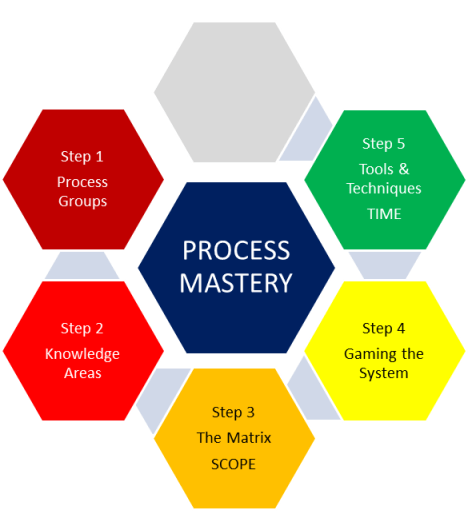
Here’s a description of the six processes that are included in the Time Knowledge Area, together with a listing of the Tools & Techniques used in those processes. As a reminder, this post will cover only 6.1 through 6.3 of the tools and techniques, but I’m including all six processes in this chart for the sake of completeness.
| Process Name |
Process Description | Tools & Techniques |
| 6.1 Define Activities | Identifying actions to be performed to produce product deliverables. | 1. Decomposition 2. Rolling wave planning 3. Templates 4. Expert judgment
|
| 6.2 Sequence Activities | Identifying and documenting relationships among the project activities. | 1. Precedence diagramming method (PDM) 2. Dependencey determination 3. Applying leads and lags 4. Schedule network templates
|
| 6.3 Estimate Activity Resources | Estimating type and quantities of resources (human and material) required to perform each activity. | 1. Expert judgment 2. Alternatives analysis 3. Published estimating data 4. Bottom-up estimating 5. Project management software |
| 6.4 Estimate Activity Durations | Approximating the number of work periods needed to complete individual activities with estimated resources. | 1. Expert judgment 2. Analogous estimating 3. Parametric estimating 4. Three-point estimates 5. Reserve analysis
|
| 6.5 Develop Schedule | Analyzing activity sequences, durations, resources requirements, and schedule constraints to create product schedule. | 1. Schedule network analysis 2. Critical path method 3. Critical chain method 4. Resource leveling 5. What-if scenario analysis 6. Applying leads and lags 7. Schedule compression 8. Scheduling tool
|
| 6.6 Control Schedule | Monitoring the status of the project to update project progress and manage changes to schedule baseline. | 1. Performance reviews 2. Variance analysis 3. Project management software 4. Resource leveling 5. What-if scenario analysis 6. Adjusting leads and lags 7. Schedule compression 8. Scheduling tool |
Let’s take a look at the tools & techniques for processes 6.1 through 6.3 in the Time Knowledge Area.
6.1 DEFINE ACTIVITIES
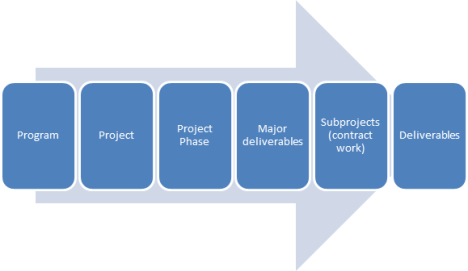
6.1.1 The technique of decomposition means subdividing the project scope and project deliverables into smaller, more manageable components to the level of work packages. This technique of decomposition was used as a tool & technique for process 5.3 Create WBS process. Here’s a view of the decomposition process from the program level down to the level of deliverables.
a. Programs are groups of related projects.
b. Projects can sometimes be broken down into distinct phases.
c. Major deliverables are first identified within each phase.
d. That work which can be outsourced to a contractor is referred to as a subproject.
e. Deliverables are broken down from the major deliverables.
.
Figure 1. Decomposition to the level of Deliverables (process 5.3 Create WBS)
Continuing along the breakdown process:
Figure 2. Decomposition to the level of Activities (process 6.1 Define Activities)

f. Once deliverables are identified, for large-scale projects planning packages are identified which are basically fill-in-the blank packages for work that has not yet been identified, but will be in the course of progressive elaboration.
g. A control account is a summary level in WBS one level above a work package. Once a group of work packages under a control account are completed, some sort of monitoring & controlling activity is done here to make sure the project is proceeding according to plan.
h. Work package is the lowest level in a work breakdown structure which both defines specific deliverables and those resources (people, equipment, etc.) assigned to complete the work.
i. The work package consists of a list of activities, which can be further broken down into …
j. Tasks, but this is sometimes a confusing term because some companies have tasks at a higher level than activities. In any case, the PMBOK® Guide relies on work packages being the lowest level of WBS which consists of a list of activities. That’s all you need to know at least for the purpose of the exam.
How does this decomposition for the 6.1 Define Activities process differ from that of 5.3 Create WBS? Actually it’s part of the same overall process, but the 5.3 Create WBS is part of the SCOPE knowledge area, and the emphasis there is on getting the project broken down into DELIVERABLES. This is represented by the top Figure 1.
The emphasis in 6.1 Define Activities is on getting down to the level of ACTIVITIES. This is represented by the bottom Figure 2.
6.1.2 Rolling Wave Planning
Rolling wave planning means that work in the near term is done down to the level of activities, but that future work is planned at a higher level of the WBS, that of planning packages (step 2 in the arrow diagram in Figure 2 of the tool & technique 6.1.1. Decomposition). As more is known, it can be decomposed into activities. This is a form of progressive elaboration.
6.1.3 Templates
If you are doing a project that has some similarities to previous projects, why reinvent the wheel? A standard activity list or a template can be used to help define typical activities and milestones.
6.1.4 Expert Judgment
Use project team members or other experts to provide expertise in defining activities. You may wonder why I include “project team members” under expert judgment, but in reality, the person who is going to actually do the work on the project is an expert regarding the question “how much time will it take you to complete your work?”
6.2 SEQUENCE ACTIVITIES
6.2.1 Precedence Diagramming Method (PDM)
Now that you have a list of activities, you have to now figure out in what order to them. The Precedence Diagramming Method takes each activity and represents it with a rectangular box often called a node. These nodes are connected with arrows that show the logical relationships that exist between them.
Here are the four types of dependencies or logical relationships between activities:
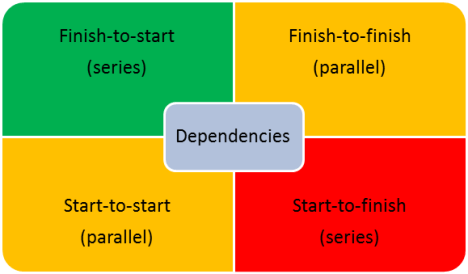
Finish-to-start means that the start of activity 2 depends on the finish of activity 1. This is the most common type of dependency, which is why it is in green. This is a typical series-type relationship between activities. Start-to-finish would be a series relationship where the finish of activity 2 depends on the start of activity 1. This is relatively rare, and that is why it is listed in red.
Start-to-finish SOUNDS like it is more likely than finish-to-start, but if you look at the following diagram, and remember that the first term deals with the predecessor activity or activity 1, then you will see that the FINISH of activity 1 is connected to the START of activity 2.
The other two dependencies are used in a situation where two activities have to be done not one after another, but in parallel with some sort of overlap between them. These are fairly common after the finish-to-start series relationship, so they are listed in orange. Just remember they are parallel relationships, and this is borne out by the fact that the terms are parallel in their description (Start-to-start, and finish-to-finish).
6.2.2. Dependency Determination
Okay, so you have a diagram that SHOWS the dependency (tool 6.2.1). How do you determine that dependency? There are three categories of dependencies.
| Dependency Category | Based on | Explanation | |
| 1. | Mandatory | Hard logic | Physical limitations; for example, concrete must dry before any load placed on it
|
| 2. | Discretionary | Soft logic | Best practices within application area; under project control.
|
| 3. | External | External factors |
Outside of project control, such as regulations or permit applications. |
In reality, BOTH mandatory and external deal with factors outside of project team’s control, the first with physical factors and the latter with factors having to do with the society within which the project takes place (mostly having to do with the government). The discretionary dependencies are the ones that are under the discretion of the project team’s control.
6.2.3. Applying Leads and Lags
In a finish-to-start relationship, you can have a situation where one activity occurs immediately after another one.
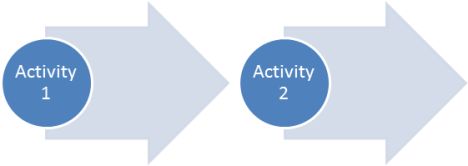
Or you can have a relationship, where there has to be a delay in the 2nd activity. Let’s say you are going to hang objects on a wall (activity 2) after it is painted (activity 1). Presumably there will be some sort of waiting period while the paint dries, and this would be the lag between activity 1 and 2.
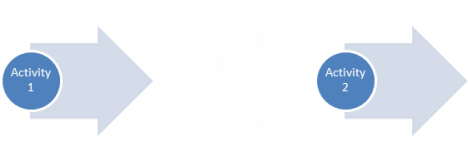
With a lead, you take the activity 1 and 2, which normally come one right after the other, 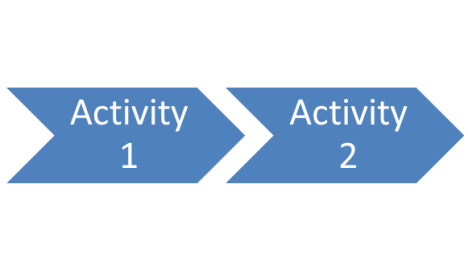
Now, instead of delaying the successor activity, as in a lag, but you accelerate it.

Now, the start of activity 2 begins before activity 1 is complete, and the amount of time from the start of activity 2 to the end of activity 1 is called a lead.
6.2.4. Schedule Network Templates
In the same way with the templates tool & technique 6.1.3 under the process 6.1 Define Activities, you can use a template for a typical sequence of activities for projects that are similar to those you have done before .
6.3 ESTIMATE ACTIVITY RESOURCES
Here is where the proverbial rubber meets the road. Now that you know WHAT activities need to be done as a result of 6.1 Define Activities, and IN WHAT ORDER they need to be done as a result of 6.2 Sequence Activities, you now need to figure out WHAT YOU NEED to do these activities, and that is what this process is about.
6.3.1 Expert Judgment
Any time you are dealing with basics of the schedule and/or budget, it is vital to have expert judgment. Remember that, when it comes to the contents of the work packages, one of the first experts you should consult is the person who is doing the work, especially if they have done that work before in the past. There are specialists in the areas of resource planning and estimating who can also be consulted, especially if the project is somewhat new and unfamiliar to your company.
6.3.2 Alternatives Analysis
Many activities may have more than one way of being done. This is basically doing a comparison between the different human resources (capability or skill level) and material resources (types of machines or tools) that are available to get an activity done.
6.3.3. Published Estimating Data
An alternative to asking an expert regarding resource planning and estimating (tool & technique 6.3.1 Expert Judgment) is to consult published data on costs of resources for past projects that exists either within the company or is publically available.
6.3.4 Bottom-Up Estimating
If an activity cannot be estimated as a whole, it can be broken down into more detail (sometimes referred to as tasks) in order to be estimated at this finer level of detail.
Note that the dependency of a series of tasks will have an effect on the total resource usage.
If the tasks within an activity are done in series (Finish-to-Start), you could have a single person do the entire activity. But if some tasks are to be done in parallel (Start-to-Start or Finish-to-Finish), you will need multiple people to do the activity because some tasks will run concurrently.
The next post will cover the tools & techniques for processes 6.4 through 6.6 from the Time Knowledge Area.
Filed under: Uncategorized |


Leave a Reply