Agile PM Process Grid-3.16 Kanban Boards


In John Stenbeck’s book “PMI-ACP and Certified Scrum Professional Exam Prep and Desk Reference”, he creates an “agile project management process grid” which describes 87 processes used in agile project management.   These processes are divided into five process groups (Initiate, Plan, Iterate, Control, and Close), which are analogous to the five process groups in traditional project management, and seven knowledge areas which can be mapped, more or less, onto the ten knowledge areas in traditional project management.

I am now covering a group of agile processes that support the “adaptive planning” knowledge area that are completed during each iteration of the project.   Process 3.17 is Task/Kanban Boards, and I am splitting up the discussion of this process into two parts; yesterday’s post was about Task Boards, and today’s post will cover Kanban Boards.

In yesterday’s description of a Task Board, there were four categories represented by vertical columns that the stories are placed in.   Each of the three categories after the initial backlog represents a “value stream”, where value is added at each stage of the stream.

  • Backlog
  • Development
  • Test
  • Completed
The Kanban board adds a “queue” column after the first component of the value stream called “Development”, and after the second and third component of the value stream called “Test” and “Completed”.
The purpose of the Kanban board is to limit WIP (those stories are being worked on) and to increase throughput, the number of stories that the team can complete in a day.   How this is done is to take each “value stream” column and to put a “WIP Limit” on it.   Then the Kanban board can be monitored to see if there are any components of the value stream that have more stories in it than the “WIP Limit” allows.   This shows where the bottlenecks are and shows where the team needs to focus its resources on in order to overcome them.   The Kanban board doesn’t tell HOW to shift the resources; that is up to the team.
A crucial component of the Kanban boards is the “Test” column, which is where the quality of the feature is tested internally before being shipped to the customer for validation.   The process that helps with the flow of work in this “Test” area is 3.16 Test-Driven Practices, and that is the subject of the next post.

Agile PM Processs Grid-3.16 Task Boards


In John Stenbeck’s book “PMI-ACP and Certified Scrum Professional Exam Prep and Desk Reference”, he creates an “agile project management process grid” which describes 87 processes used in agile project management.   These processes are divided into five process groups (Initiate, Plan, Iterate, Control, and Close), which are analogous to the five process groups in traditional project management, and seven knowledge areas which can be mapped, more or less, onto the ten knowledge areas in traditional project management.

I am now covering a group of agile processes that support the “adaptive planning” knowledge area that are completed during each iteration of the project.   Process 3.17 is Task/Kanban Boards, and I am splitting up the discussion of this process into two parts; today’s post is about Task Boards.

What is a Task Board (aka a Story Board)?   They are a visual radiator of the project’s work organization as well as how much work is left.   They are used during daily meetings to focus discussion on the topics needed to synchronize their work efforts.

A typical task board shows columns for stories which are in the following four categories:

  • Backlog
  • Development (WIP)
  • Test
  • Completed

At a Certified ScrumMaster class I took in January, we did a simulation of an agile project where the class broke into teams, and each team did a simulated project.   The teams created stories we put in the backlog column of the task board, and we each took one or two stories which we put in the development column, and then the testing and finally the completion column.   In our simulation, the “testing” column meant explaining to the other teams what we were working on under development, and we listened to their suggests for improvements as we worked on completing the stories.

By the time we were done with the simulation, we not only got an idea of what scrum means on an intellectual basis, but we also got to see what scrum feels like.

By the way, the reason why we worked on two stories was so that, it we got stuck on any one task, we could switch to the other while our scrum master helped us get unstuck on the first one.   If someone completes both stories within the time limit of the iteration (ours was only 10 minutes long during the simulation), we had the option to start on another story.

There is a special type of task board, called a Kanban board, which is the subject of the next post.


Agile PM Process Grid-3.15 Burn Charts


In John Stenbeck’s book “PMI-ACP and Certified Scrum Professional Exam Prep and Desk Reference”, he creates an “agile project management process grid” which describes 87 processes used in agile project management.   These processes are divided into five process groups (Initiate, Plan, Iterate, Control, and Close), which are analogous to the five process groups in traditional project management, and seven knowledge areas which can be mapped, more or less, onto the ten knowledge areas in traditional project management.

I am now covering a group of agile processes that support the “adaptive planning” knowledge area that are completed during each iteration of the project.

There are two types of burn charts used in agile:   burn-down charts show the amount of work remaining in the project or release.   Burn-down charts usually reflect the results of the team’s daily meeting.

Burn-Down Chart

Look at the example of a burn-down chart given above.   The blue line represents the  number of stories that should be remaining on any given day of the iteration.   Pretend that the y-axis says “work remaining” which can be measured in stories or features, rather than the “days remaining” that is on the example now.

The red line represents the actual progress on the project.   Let’s say that at the beginning of the project there are technical challenges experienced which cause the project to be behind schedule.    This is shown visually on the chart by the red actual line being above the blue ideal line.    If those challenges are surmounted, and the project gets ahead of schedule starting on about day 7, then this is shown visually on the chart by the red actual line being below the blue ideal line.

These trend lines that emerge become a powerful visual communicator of the team’s progress, or lack thereof, towards the iteration goal.   The burn-down chart can be used, for example, to forecast the probability of completing the entire scope by the end of the iteration.

The use of burn charts like the one described in this post imply the existence of a Task Board, which is the topic of the next post.

Agile PM Process Grid-2.10 Cumulative Flow Diagrams


In John Stenbeck’s book “PMI-ACP and Certified Scrum Professional Exam Prep and Desk Reference”, he creates an “agile project management process grid” which describes 87 processes used in agile project management.   These processes are divided into five process groups (Initiate, Plan, Iterate, Control, and Close), which are analogous to the five process groups in traditional project management, and seven knowledge areas which can be mapped, more or less, onto the ten knowledge areas in traditional project management.

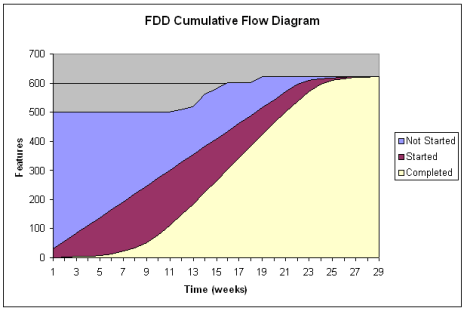
Here is an example of the tool used to improve performance on agile project.   The stories in the blue area are in the backlog, and have not yet been started.   The stories in the purple area are started, but not yet completed, and are therefore Works In Progress or WIP.   The stories in the pink area are completed.   (NOTE:  the diagram uses the concept of features rather than stories, but the concept is the same.)

CFD

The WIP at any point in time can be measured by the number of stories between the top of the purple area to the bottom of the purple area.   So, for example, on week 11, the amount of stories that are WIPs is 300 – 100 = 200.   You can imagine that, in between weeks 9 and 11, the agile project manager looked at the CFD diagram and saw that the WIP was getting to be undesirably large.    Then measures were taken to reduce the amount of WIP (see previous post) and then the WIP narrows significantly in the following weeks.   Reducing the WIP, by Little’s Law (see previous post), has a corresponding effect on cycle time.   So a Cumulative Flow Diagram gives a transparent picture on the progress of the project.

The next post will cover the next knowledge area covered repeatedly during iterations, namely, value-driven delivery (i.e., quality).

Agile PM Process Grid-2.9 WIP Limits and Little’s Law


In John Stenbeck’s book “PMI-ACP and Certified Scrum Professional Exam Prep and Desk Reference”, he creates an “agile project management process grid” which describes 87 processes used in agile project management.   These processes are divided into five process groups (Initiate, Plan, Iterate, Control, and Close), which are analogous to the five process groups in traditional project management, and seven knowledge areas which can be mapped, more or less, onto the ten knowledge areas in traditional project management.

Work-in-Process (WIP) is a concept borrowed, as much of agile methodology is, from Lean thinking to improve the value stream of product development.   The basic idea is that a project is a type of WIP because the business cannot realize value from user stories in process, but ONLY from potentially shippable increments of the solution.

In the first of three posts, I explained how WIP is measured.   In the second of three posts, I listed some ideas John Stenbeck gave on how to reduce WIP.   One tool in measuring the effective of measures to reduce WIP is called Little’s Law, and that is the subject of this post.

Little’s Law was created by John Little of MIT, and it applies to the relationship between

  • cycle time (the time required to deliver a potentially shippable increment of the solution)
  • WIP (the number of stories that are currently being developed, but which are not yet at a point where they are potentially shippable), and
  • throughput (the rate at which stories are being developed in the system)

Let’s take two examples from p. 182 of John Stenbeck’s book.

  1. 200 stories of WIP, where the team produces 10 stories per day:   here Cycle Time = WIP/throughput = 200/10 = 20 days required to deliver a potentially shippable increment of the solution.
  2. 200 stories of WIP, where the team produces 100 stories per day:  here Cycle Time = WIP/throughout = 200/100 = 2 days required to deliver a potentially shippable increment of the solution.

The reason why these two examples were chosen by John Stenbeck is because the WIP is the same.   The variable that changes is the throughput, the number of stories the team can complete in a day.

So if you want to reduce the cycle time there are two ways of going about it:

  • reduce the WIP, ways of doing which are listed in the last post, or
  • INCREASE the throughput, i.e., the number of stories a team can produce in a day.

This can be done obviously by throwing more people onto the team, but there are some processes external to the team which may be influencing how fast the team can come up with solutions, i.e., clarity of the requirements.

The next process in the “Value-Driven Delivery” knowledge edge that is used regularly in iterations is 2.10 Cumulative Flow Diagrams, which is covered in the next post.

Agile PM Process Grid–2.9 WIP Limits (2)


In John Stenbeck’s book “PMI-ACP and Certified Scrum Professional Exam Prep and Desk Reference”, he creates an “agile project management process grid” which describes 87 processes used in agile project management.   These processes are divided into five process groups (Initiate, Plan, Iterate, Control, and Close), which are analogous to the five process groups in traditional project management, and seven knowledge areas which can be mapped, more or less, onto the ten knowledge areas in traditional project management.

Work-in-Process (WIP) is a concept borrowed, as much of agile methodology is, from Lean thinking to improve the value stream of product development.   The basic idea is that a project is a type of WIP because the business cannot realize value from user stories in process, but ONLY from potentially shippable increments of the solution.

It reminds me of a cartoon from a physics textbook I had in high school.    On the left was a circus clown who had a chair in front of him that was nailed to the floor.    He was grunting and straining at his task, apparent by the sweat that was pouring copiously from his brow.    On the right was another circus clown who took a feather and lifted it up off the floor.   The question in the caption was “which clown did more work?”

The answer the uninitiated might give is the clown on the left, because he’s breaking a sweat and the clown on the right isn’t.   But if you take the technical definition of work as a weight moved a certain distance, the answer is clear:   the circus clown on the right did more “work” in the physics sense, because he moved the feather, admittedly a very light-weight object, a certain distance (let’s say six feet, from the floor to the height of the clown’s head).    But the clown on the left did ZERO work because the much heavier object was moved a distance of exactly ZERO meters, and anything multiplied by zero equals zero.

How did this relate to WIP?   Work in progress is the attempt to get something accomplished; the actual accomplishment is the ONLY thing that counts towards value towards the customer.   In the case of the two clowns, the one thing that kept the clown on the left from being effective was the impediment of the chair being nailed to the floor, which, if he had noticed it, and remedied the situation, would have allowed him to do more work than the clown on the right.

In the post, I talked about MEASURING Work-In-Progress or WIP.   Once you have a measure of WIP, how do you reduce it?   Here are some suggestions given by John Stenbeck:

  1. Reduce the iteration backlog to match the team’s capacity.
  2. Improve the actual work process with what is considered a “best practice” process.
  3. Remove the most common impediments to the process.
  4. Synchronize team members to avoid duplication of efforts, and to avoid any wasted time during the handoff of work from one team member to another.
  5. Manage workflow by means of a storyboard.
  6. Obtain additional resources if limited resources are what is causing a WIP not to achieve a result.

One other way to get a handle on WIP is to use Little’s Law, a relationship between cycle time, WIP, and throughput in a production system in a steady state.   That is the subject of the following post.

Agile PM Process Grid-2.9 Work-in-Process Limits (1)


In John Stenbeck’s book “PMI-ACP and Certified Scrum Professional Exam Prep and Desk Reference”, he creates an “agile project management process grid” which describes 87 processes used in agile project management.   These processes are divided into five process groups (Initiate, Plan, Iterate, Control, and Close), which are analogous to the five process groups in traditional project management, and seven knowledge areas which can be mapped, more or less, onto the ten knowledge areas in traditional project management.

Work-in-Process (WIP) is a concept borrowed, as much of agile methodology is, from Lean thinking to improve the value stream of product development.   The basic idea is that a project is a type of WIP because the business cannot realize value from user stories in process, but ONLY from potentially shippable increments of the solution.

In the previous post discussing cycle time, it was noted that the business can derive value sooner if the cycle time is shortened, particularly through process improvements external to the time.

The use of WIP limits improves the team’s workflow by controlling the amount of WIP at each step in the process.   This helps the team overcome perceived impediments to completely finishing each story.   The helpful analogy that John Stenbeck gives is the same way stop lights on freeway on-ramps prevent rush hour gridlock by limiting the number of cars entering the system depending on how many cars are already in the system.

In agile terms, WIP limits limit the number of stories being actively worked on by the team at any single point in time.    This actually courses more stories to be completed.

How do you measure WIP?   It would seem to be complicated because it is a moving variable, like the traffic moving on the freeway in the analogy given above.   The best way to measure and manage WIP is to

  1. check the story board a few times per day and count how many stories are in the queue:  this will be the current WIP level.
  2. Take the average of the measurements after a few days and give some sort of buffer for comfort.
  3. Estimate the maximum and set it as the initial limit or starting Maximum Allowable WIP.
  4. Make periodic reductions in the limit and measure the impact on productivity.
  5. The most desirable WIP limit will emerge rather quickly.

This shows you reference point for WIP measurement.

How do you reduce WIP once you’ve measured it?   That will be the subject of the next post.

Agile PM Process Grid-2.8 Cycle Time Measurement


In John Stenbeck’s book “PMI-ACP and Certified Scrum Professional Exam Prep and Desk Reference”, he creates an “agile project management process grid” which describes 87 processes used in agile project management.   These processes are divided into five process groups (Initiate, Plan, Iterate, Control, and Close), which are analogous to the five process groups in traditional project management, and seven knowledge areas which can be mapped, more or less, onto the ten knowledge areas in traditional project management.

Cycle time in general is the amount of time required to delivered capabilities.   In any framework, whether it be agile or traditional PM, the concept is to measure cycle time so that it can be reduced by removing those activities that don’t create value and thus waste time.

In an agile framework, the definition of cycle time is narrower:   it is the start-to-finish time required to complete a potentially shippable increment of the solution.   One thing to understand is that cycle time is a process measure, not a person measure.   In other words, the cycle time may be four weeks given a certain set of resources working on the solution.   However, with other resources that are more effective, that same solution may take only three weeks.

To improve cycle time, John Stenbeck gives four guideslines.

  1.  Build the roadmap as a swarm–bring together all of the people involved on the project, in order to gain everyone’s insights on how to decrease the overall time required to complete the product.
  2. Define acceptance metrics for releases and iterations–this is focused on the customer/proxy (aka the Product Owner) to produce specific metrics that will validate the potentially shippable increments; this will reduce the time between releases as the acceptance (i.e., validation) process will be minimized.
  3. Select an iteration length that is sustainable–although an iteration length is referred to as a “sprint”, the entire project must be run as a marathon, which must be run at a steady pace over the long haul, one that is conducive to the repeated completion of potentially shippable increments.
  4. Recalibrate and institutionalize learning–this improves the team dynamic within the iteration by creating a learning exchange between members, and scaling up the learning achieved individually to the institutional level that ends up creating organization standards that increase the company’s ability to more accurately estimate cycle times for roadmaps and release plans.

The next post will cover process 2.9 Work-in-Process (WIP) limits.

Agile PM Process Grid-1.8 Product Backlog Grooming


In John Stenbeck’s book “PMI-ACP and Certified Scrum Professional Exam Prep and Desk Reference”, he creates an “agile project management process grid” which describes 87 processes used in agile project management.   These processes are divided into five process groups (Initiate, Plan, Iterate, Control, and Close), which are analogous to the five process groups in traditional project management, and seven knowledge areas which can be mapped, more or less, onto the ten knowledge areas in traditional project management.

In this post, we will cover the process done during the “Iteration” process group that relates to the “External Stakeholders Engagement” knowledge area:   Process 1.8 Product Backlog Grooming.

I like John Stenbeck’s description of the product backlog grooming as the “steering wheel”, which allows for course corrections to make sure the project is going in the right direction.   What is the right direction?    This must be determined by the Product Owner or customer/proxy.   He or she needs to

  • refine the business value assessment of the product
  • set backlog priorities accordingly.

The latter responsibility, that of setting priorities, is what drives the process of product backlog grooming.    The setting of priority involves discerning the timing of the development of minimally marketable features (MMF) to create both incremental and long-term value.

Since it evolves on an iterative basis, the product backlog is not “written in stone” and is a living document which evolves as the requirements are elaborated.   Just because the customer wants a feature at Sprint #1 doesn’t mean that the customer will want that feature at Sprint #10.   The conversation between the customer and the development team may cause the customer to change his or her mind regarding the product vision and how that is to be expressed in the product under development.

The product backlog grooming process, aka product backlog management, prioritizes each item on the product backlog, moving items from the outer edge of the time horizon to the mid-term to the current time horizon.

It is known that product backlog grooming reduces waste, which has a positive effect on the company’s bottom line.    How does it accomplish this?    By delivering those items that creates business value within the capacity of the team to deliver that value.    Reducing waste is a Lean Manufacturing principle that is imbedded in the intellectual DNA of agile frameworks.

The next post covers processes that are done in the “iteration” process group that are related to the next knowledge area, value-driven delivery.