Agile PM Process Grid-5.6 Problem Solving


In John Stenbeck’s book “PMI-ACP and Certified Scrum Professional Exam Prep and Desk Reference”, he creates an “agile project management process grid” which describes 87 processes used in agile project management.   These processes are divided into five process groups (Initiate, Plan, Iterate, Control, and Close), which are analogous to the five process groups in traditional project management, and seven knowledge areas which can be mapped, more or less, onto the ten knowledge areas in traditional project management.

I am now covering a block of five processes that relate to risk management which are done on a repeating basis during each iteration of the project.   The first of these processes is 5.6 Problem Solving.

Risk management in agile project management begins with the science of simplicity, which means maximizing the amount of work not done by:

  • eliminating what doesn’t need to be done
  • focusing on ONLY what is essential

The idea is that by doing the above in each iteration, the customer/proxy will be able to clarify what the key functions of the product are from the standpoint of the customer.   In this way, the cost and risk associated with developing possibly unneeded functions is postponed until the need for those functions is established.

In short, if a feature isn’t essential to the product, it doesn’t get built!

The next post covers process 5.7 Continuous Integration.

The Veterans PMP Program at PMI Chicagoland (Updated)


In 2015, I volunteered for the Veterans PMP program at the Chicagoland chapter of the Project Management Institute (PMI).  Run in conjunction with Black Diamond Charities, it is a program that helps veterans or those who are active duty military personnel who are thinking of pursuing a career in project management.   Last year on Veterans Day I wrote about the program, but because yesterday we started our 4th version of the program, I wanted to update the post with some of the new features that we added.

The Veterans PMP program actually started out at Fort Bragg, North Carolina, and there were members of PMI Chicagoland who were veterans themselves and thought, “hey, we’re one of the largest chapters of PMI in the world; we could reach a lot of veterans if we ran the program in the Chicagoland area!”   And that’s what happened:   Aisleigh McGann, the VP of Community Outreach, was approached by several veterans, some of whom had connections with Black Diamond Charities, and a pilot program was run in the fall of 2014.

Black Diamond Charities (referred hereafter as BDC) goes to where active duty military or veterans are likely to be in the Chicagoland area, such as the Great Lakes Naval Station or the U.S. Army Reserve Training Center, and recruits those who might be interested in the program.   Once they express interest and are enrolled in the next group of candidates for the program, BDC coordinates with the PMI Chicagoland director of the program, Antoine Taylor.

The Veterans PMP program consists of the following three phases:

  1. PMP Instruction (5 weeks)
  2. PMP mentoring (2 weeks)
  3. PMP study group (12 weeks)

This is the fourth round of the program and we got 20 people enrolled in the program.

PMP Instruction

This phase gives 35 hours of general instruction in project management, and is given by a team of about half a dozen instructors, including myself.     Besides the instruction, the participants are split up into four teams of 5 people each and given the assignment of creating an idea for a project, and not only doing all of the project documents (such as the project management plan), but doing a presentation to the group on the final day of class explaining the project and showing those documents to the project sponsors.    It not only gives them the theoretical foundation through the classroom instruction, but also gives them a hands-on example of what doing a real project is like.

Some of the topics are not from the PMBOK, but are related to the subject of how a military person can interact with civilians on the same team with the knowledge that the civilians don’t have a military background and therefore may not have the same values.  “Why don’t they just do what I tell them to do, like we had to do all the time in the military”?

The final day of the workshop is presentation day, when the groups present their projects to actual senior-level executives who come in to observe the presentations and ask the kind of questions they would ask in their companies.   This is a level of realism which we think adds to the depth of the participants’ experience.    We heard the last class refer to this as this week as “Shark Tank” week, but everybody ends up coming out a winner from our program!

PMP Mentoring

We had a mentoring session in the past where we brought in people to talk on various topics that would be of interest to people pursuing a career in project management.   This part that focuses not on technical knowledge, but on practical knowledge on how to pursue a particular job or how to upgrade one’s own current position.   This year we’re turning it up a notch:  we borrowed a page from the general Mentoring Program at PMI Chicagoland and this time we have 10 chapter volunteers so far to act as volunteers to be one-on-one mentors with the people in the program.   We are looking for more volunteers, but the ones we have so far are really committed to getting to know the members of the class, and to see what resources the chapter can bring to bear into helping them get to where they want to go.

PMP Study Group

For those that are serious about going on to take the exam, I ran a PMP Study Group last summer which covered one chapter of the PMBOK Guide every week.    This not only presents the material in detail, as opposed to the high-level introduction that was done in the PMP Instruction phase.    This time around, besides myself, we have two additional volunteers who specialize in instruction of the PMP material, so we’ll definitely be able to get this done.   We will make sure that everyone in that group who wants to pursue a PMP will make it to the finish line.

Last year we ran two programs, but word is spreading about our program in the military communities in the state of Illinois, and if it continues in popularity, I would love to see our chapter put on three programs, or even run two programs simultaneously.

Conclusion

We’re not just doing this Veterans PMP program out of charity towards veterans who are both deserving and underserved; we’re doing it because of the conviction we have that the business community in Chicagoland needs managers who are also leaders.   Fortunately, I am the Director of Executive Outreach for the PMI Chicagoland chapter this year, and it is my mission to help companies to see that the veterans coming out of the military as a tremendous potential asset to them!

Agile PM Process Grid—Process 4.7 Coaching/Mentoring and 4.8 Conflict Resolution


The processes that support or nurture team performance are 4.7 Coaching/Mentoring and 4.8 Conflict Resolution.    The reason why I am combining these into one post is because, in my mind, they are both part of the “soft skills” you need as an agile project manager.

You may know the phrase “lead, follow or get out of the way.”   As a project manager for an agile project, your job is not so much to lead, and it is definitely not to follow, but rather it is to get things out of the TEAM’s way that may prevent them from getting the work done.

What are some of those impediments?   They fall into two groups, internal and external impediments.

Internal impediments include those elements within the team itself that are preventing work from getting done:

  • Lack of commitment to the iteration goals
  • Interpersonal conflict between team members
  • Vague communications during daily planning meetings
  • Lack of coordination or synchronization between team members
  • Ineffective use of influence in getting support from key stakeholders

External impediments include those elements outside of the team but within the company that are preventing work from getting done:

  • Department (operational) work or other project work overwhelming the capacity of a team member
  • Management behavior that is not consistent with agile principles and behaviors.
  • Compensation incentives not aligned to either teamwork or individual work by team members.
  • Managers exerting inappropriate control over team members.
  • Organizational churn causing frequent changes in the team.

The following are five of the best practices for removing these impediments and nurturing team success:

  1. On-going training
  2. Maintaining osmotic (open and transparent) communication within the team
  3. Top management support as a champion of the project within the company
  4. Team member interaccountability regarding measurable progress towards achievement of iteration goals
  5. Standards for supportive team behavior

One way of making sure the team is on track is to use agile metrics, which is the subject of the next post.

Agile PM Process Grid-3.19 Wireframes


In John Stenbeck’s book “PMI-ACP and Certified Scrum Professional Exam Prep and Desk Reference”, he creates an “agile project management process grid” which describes 87 processes used in agile project management.   These processes are divided into five process groups (Initiate, Plan, Iterate, Control, and Close), which are analogous to the five process groups in traditional project management, and seven knowledge areas which can be mapped, more or less, onto the ten knowledge areas in traditional project management.

I am now covering a group of agile processes that support the “adaptive planning” knowledge area that are completed during each iteration of the project.   Process 3.15 was Burn Down Charts, Process 3.16 was Task/Kanban Boards, Process 3.17 was Test-Driven Practices, Process 3.18 was Agile Modeling, and this post is dedicated to the last of this block of processes, Process 3.19 Wireframes.

What is a wireframe in the context of an agile project?   It is a visual guide starting with a framework and layering on facets of the desired solution.   Think of a blueprint for the construction of a building.   The “wireframe” might be considered the physical structure of the building, which obviously has to be built first.    Then you might have a layer for the electrical system, the hydraulic system, the transportation system (elevators and/or stairs), etc., overlaid on top of the wireframe that contains the building’s structure.

Wireframes generally contain the following:

  • Categories of information to be communicated
  • Prioritization of functions
  • Range of functional choices to be managed
  • Guidelines on how information is shared

Let me use an example from a Certified ScrumMaster class I took a few weeks ago.    Our job as a team was to come up with a flyer or poster describing our new product.   We were not to create the product itself, but merely to visualize the product to the extent that we could create a poster with information describing the product for potential customers.

Our team chose to develop a product of designer gloves, that is, gloves that were specifically designed to each specific user by the use of a hand-scanning system that could be accessed at various selected clothing stores.

What information would be come up with in order to entice customers into trying our product?   We divided the poster “real estate” into various sections and those that had priority were on the top of the flyer.    So we put the functional features on the top with a picture of a sample product.    Celebrity endorsements and other emotional appeals were put farther down on the flyer.    We were in effect creating a wireframe of the poster.   We had the categories of information to be communicated which we put in the various spaces of the poster, “feature list”, “product photograph,” “celebrity endorsements”, “contact information,” etc.    Then when we came to producing those elements, we put them in the “wireframe” model.    Every once and a while, seeing the visual placement of the elements made us rethink the way we did the original layout.

So it gave the team the ability to get a visual “reality check” on our approach to an emergent design solution.   That is what wireframes are good at, and I found it to be effective in our “mock” project environment.   I’m sure it will be helpful when I use it on an actual agile project!

The next post starts the next set of processes, 4.7 Coaching/Mentoring, and 4.8 Conflict Resolution, that relate to the Team Performance knowledge area and are used repeatedly during the Iteration phase of an agile project.

Agile PM Process Grid–3.18 Agile Modeling


In John Stenbeck’s book “PMI-ACP and Certified Scrum Professional Exam Prep and Desk Reference”, he creates an “agile project management process grid” which describes 87 processes used in agile project management.   These processes are divided into five process groups (Initiate, Plan, Iterate, Control, and Close), which are analogous to the five process groups in traditional project management, and seven knowledge areas which can be mapped, more or less, onto the ten knowledge areas in traditional project management.

I am now covering a group of agile processes that support the “adaptive planning” knowledge area that are completed during each iteration of the project.   Process 3.15 was Burn Down Charts, Process 3.16 was Task/Kanban Boards, process 3.17 was Test-Driven Practices, and this post covers process 3.18 Agile Modeling.

Here are the basic principles behind Agile Modeling (AM).

  1. Create multiple models in small increments–this is because any given model is bound to include some inaccuracies, and having multiple models will more likely produce code that ends up actually working
  2. Create an abstract representation of the software–then prove or disprove its performance with code that either works or does not work
  3. Use the right artifacts from each model–team improves its understanding of the approach to the solution
  4. Follow a continuous forward match–iterating to the next model after one model is verified
  5. Get active stakeholder participation in AM–project stakeholders know what the result of a successful model will be and can provide crucial feedback needed to improve between each model
  6. Use applied simplicity–focus on the practice of only creating models for the current facet of the problem; this goes hand in hand with principle 1 above of creating multiple models in small increments, avoiding large, detailed models.   Do just enough modeling to understand the scope of the problem and the architecture of possible solutions.
  7. Use open communication–display models on walls or Wiki’s, embrace collective ownership of artifacts, and use group-based model development.

These principles allow a team to do modeling in such a way that possible solutions are suggested, tested, and then improved upon in subsequent development iterations.

The next post covers the last of the processes related to the adaptive planning knowledge area, namely, Process 3.19 Wireframes.

Agile PM Process Grid-3.17 Test-Driven Practices


In John Stenbeck’s book “PMI-ACP and Certified Scrum Professional Exam Prep and Desk Reference”, he creates an “agile project management process grid” which describes 87 processes used in agile project management.   These processes are divided into five process groups (Initiate, Plan, Iterate, Control, and Close), which are analogous to the five process groups in traditional project management, and seven knowledge areas which can be mapped, more or less, onto the ten knowledge areas in traditional project management.

I am now covering a group of agile processes that support the “adaptive planning” knowledge area that are completed during each iteration of the project.   Process 3.15 was Burn Down Charts, Process 3.16 was Task/Kanban Boards, and this post covers process 3.17 Test-Driven Practices.

Let’s use as a point of departure the four columns used in a typical task or story board:

  1. Backlog
  2. Development (WIP)
  3. Test
  4. Completed

The basic idea of Test-Driven Practices is that “emergent designs” required by agile will be created when the tests (the third category above) are specified BEFORE stories are moved from the backlog (first category) to development (second category).   So in reality the flow of work is

  1. Backlog
  2. Specify Tests
  3. Development
  4. Test
  5. Complete

The reason why test-driven practices are used in agile is because they reduce both technical risk (i.e., through reduction in defects) AND market risk (i.e., through rapid delivery of product into the market).

And just in the way that development work is decomposed, work on tests are also decomposed so that you start with the top-level acceptance test and decompose it into unit tests.

One of the processes that promotes such decomposition in both testing and development is process 3.18 Agile Modeling, which is the subject of the next post.

Agile PM Process Grid-3.16 Kanban Boards


In John Stenbeck’s book “PMI-ACP and Certified Scrum Professional Exam Prep and Desk Reference”, he creates an “agile project management process grid” which describes 87 processes used in agile project management.   These processes are divided into five process groups (Initiate, Plan, Iterate, Control, and Close), which are analogous to the five process groups in traditional project management, and seven knowledge areas which can be mapped, more or less, onto the ten knowledge areas in traditional project management.

I am now covering a group of agile processes that support the “adaptive planning” knowledge area that are completed during each iteration of the project.   Process 3.17 is Task/Kanban Boards, and I am splitting up the discussion of this process into two parts; yesterday’s post was about Task Boards, and today’s post will cover Kanban Boards.

In yesterday’s description of a Task Board, there were four categories represented by vertical columns that the stories are placed in.   Each of the three categories after the initial backlog represents a “value stream”, where value is added at each stage of the stream.

  • Backlog
  • Development
  • Test
  • Completed
The Kanban board adds a “queue” column after the first component of the value stream called “Development”, and after the second and third component of the value stream called “Test” and “Completed”.
The purpose of the Kanban board is to limit WIP (those stories are being worked on) and to increase throughput, the number of stories that the team can complete in a day.   How this is done is to take each “value stream” column and to put a “WIP Limit” on it.   Then the Kanban board can be monitored to see if there are any components of the value stream that have more stories in it than the “WIP Limit” allows.   This shows where the bottlenecks are and shows where the team needs to focus its resources on in order to overcome them.   The Kanban board doesn’t tell HOW to shift the resources; that is up to the team.
A crucial component of the Kanban boards is the “Test” column, which is where the quality of the feature is tested internally before being shipped to the customer for validation.   The process that helps with the flow of work in this “Test” area is 3.16 Test-Driven Practices, and that is the subject of the next post.

Agile PM Processs Grid-3.16 Task Boards


In John Stenbeck’s book “PMI-ACP and Certified Scrum Professional Exam Prep and Desk Reference”, he creates an “agile project management process grid” which describes 87 processes used in agile project management.   These processes are divided into five process groups (Initiate, Plan, Iterate, Control, and Close), which are analogous to the five process groups in traditional project management, and seven knowledge areas which can be mapped, more or less, onto the ten knowledge areas in traditional project management.

I am now covering a group of agile processes that support the “adaptive planning” knowledge area that are completed during each iteration of the project.   Process 3.17 is Task/Kanban Boards, and I am splitting up the discussion of this process into two parts; today’s post is about Task Boards.

What is a Task Board (aka a Story Board)?   They are a visual radiator of the project’s work organization as well as how much work is left.   They are used during daily meetings to focus discussion on the topics needed to synchronize their work efforts.

A typical task board shows columns for stories which are in the following four categories:

  • Backlog
  • Development (WIP)
  • Test
  • Completed

At a Certified ScrumMaster class I took in January, we did a simulation of an agile project where the class broke into teams, and each team did a simulated project.   The teams created stories we put in the backlog column of the task board, and we each took one or two stories which we put in the development column, and then the testing and finally the completion column.   In our simulation, the “testing” column meant explaining to the other teams what we were working on under development, and we listened to their suggests for improvements as we worked on completing the stories.

By the time we were done with the simulation, we not only got an idea of what scrum means on an intellectual basis, but we also got to see what scrum feels like.

By the way, the reason why we worked on two stories was so that, it we got stuck on any one task, we could switch to the other while our scrum master helped us get unstuck on the first one.   If someone completes both stories within the time limit of the iteration (ours was only 10 minutes long during the simulation), we had the option to start on another story.

There is a special type of task board, called a Kanban board, which is the subject of the next post.


Agile PM Process Grid-3.15 Burn Charts


In John Stenbeck’s book “PMI-ACP and Certified Scrum Professional Exam Prep and Desk Reference”, he creates an “agile project management process grid” which describes 87 processes used in agile project management.   These processes are divided into five process groups (Initiate, Plan, Iterate, Control, and Close), which are analogous to the five process groups in traditional project management, and seven knowledge areas which can be mapped, more or less, onto the ten knowledge areas in traditional project management.

I am now covering a group of agile processes that support the “adaptive planning” knowledge area that are completed during each iteration of the project.

There are two types of burn charts used in agile:   burn-down charts show the amount of work remaining in the project or release.   Burn-down charts usually reflect the results of the team’s daily meeting.

Burn-Down Chart

Look at the example of a burn-down chart given above.   The blue line represents the  number of stories that should be remaining on any given day of the iteration.   Pretend that the y-axis says “work remaining” which can be measured in stories or features, rather than the “days remaining” that is on the example now.

The red line represents the actual progress on the project.   Let’s say that at the beginning of the project there are technical challenges experienced which cause the project to be behind schedule.    This is shown visually on the chart by the red actual line being above the blue ideal line.    If those challenges are surmounted, and the project gets ahead of schedule starting on about day 7, then this is shown visually on the chart by the red actual line being below the blue ideal line.

These trend lines that emerge become a powerful visual communicator of the team’s progress, or lack thereof, towards the iteration goal.   The burn-down chart can be used, for example, to forecast the probability of completing the entire scope by the end of the iteration.

The use of burn charts like the one described in this post imply the existence of a Task Board, which is the topic of the next post.

Agile PM Process Grid-2.10 Cumulative Flow Diagrams


In John Stenbeck’s book “PMI-ACP and Certified Scrum Professional Exam Prep and Desk Reference”, he creates an “agile project management process grid” which describes 87 processes used in agile project management.   These processes are divided into five process groups (Initiate, Plan, Iterate, Control, and Close), which are analogous to the five process groups in traditional project management, and seven knowledge areas which can be mapped, more or less, onto the ten knowledge areas in traditional project management.

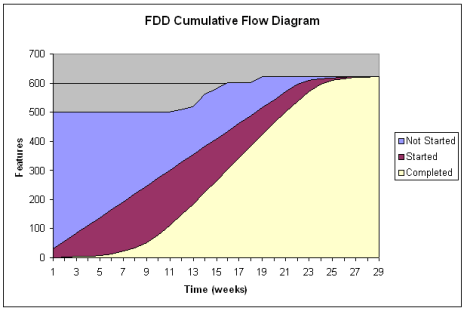
Here is an example of the tool used to improve performance on agile project.   The stories in the blue area are in the backlog, and have not yet been started.   The stories in the purple area are started, but not yet completed, and are therefore Works In Progress or WIP.   The stories in the pink area are completed.   (NOTE:  the diagram uses the concept of features rather than stories, but the concept is the same.)

CFD

The WIP at any point in time can be measured by the number of stories between the top of the purple area to the bottom of the purple area.   So, for example, on week 11, the amount of stories that are WIPs is 300 – 100 = 200.   You can imagine that, in between weeks 9 and 11, the agile project manager looked at the CFD diagram and saw that the WIP was getting to be undesirably large.    Then measures were taken to reduce the amount of WIP (see previous post) and then the WIP narrows significantly in the following weeks.   Reducing the WIP, by Little’s Law (see previous post), has a corresponding effect on cycle time.   So a Cumulative Flow Diagram gives a transparent picture on the progress of the project.

The next post will cover the next knowledge area covered repeatedly during iterations, namely, value-driven delivery (i.e., quality).