5th Edition PMBOK® Guide—Chapter 8: Interrelationship Digraphs


There are seven quality management tools that are listed among the main tools & techniques for Process 8.2 Perform Quality Assurance.    This posts covers the third out of seven tools, Interrelationship Digraphs.   The word “Digraphs” refers to the linking of various pairs of ideas.

The Relations Diagram, also known as an Interrelationship Diagram (or Digraph), is a brainstorming tool for exploring the cause-and-effect relationship between a series of ideas or facts.    It is often used to explore the relationship between a series of ideas that were generated using other quality tools, such as the Affinity Diagram (tool #1), Tree Diagram (tool #4), or the Fishbone or Ishikawa Diagram (one of the quality ools from process 8.1 Plan Quality Management).

Here’s how it works (the methodology is similar to that of Quality Management Tool #1: Affinity Diagrams):

  Step Description
1. Identify Problem Define your problem or identify a general theme. Example: why has customer satisfaction rate been declining?
2. Collect facts/ideas List the relevant facts, data, or ideas, opinions regarding the subject and put these on the post-in notes or index cards. Post these on a noteboard or blackboard.
3. Create groups Notice which of these notes or cards are related to each other similar and arrange them according to patterns based on those cohesive groups.
4. Identify Groupings Label each group of similar notes or cards with a label for each group. These could be aspects of the problem under consideration.
5. Identify Relationships Identify cause-and-effect relationships between various ideas or facts. Draw an arrow if one idea, effect, or fact is caused by another, with the arrow going from the cause to the effect.
5. Analyze Results Look at the number of arrows leading into and the number of arrows leading out of each idea. Those that have the most arrows going out are causes, and those that have the most arrows going in are effects.
6. Share Results Share the results with the stakeholders at large.

The results should show the natural links that emerge among the various issues or presented, and will help the team discover root causes of the problem defined at the beginning.   


5th Edition PMBOK® Guide–Chapter 8: Process Decision Program Chart (PDPCs)


There are seven quality tools listed under the “tools & techniques” for process 8.2 Perform Quality Assurance.   This post covers the 2nd of these seven tools, Process Decision Program Charts or PDPCs.  The idea of the tool is list those steps which are required to get towards a goal.   They are particularly useful in contingency planning because it aids in identifying intermediate steps which might derail the achievement of that goal.

In a way, a process decision program chart is similar to failure mode effects analysis in that it tries to map out the ways things can wrong, not with respect to the design, but with respect to the process itself. It is a way of mapping out countermeasures to those things that can go wrong, and so could be considered a tool of risk management.  Risk management is especially important when projects are complex and the schedule constraint is tight (i.e., no delays permissible).

Here’s the steps required to create a PDPC.   Please note that this tool may require the output of the fourth out of seven quality tools listed for this process, namely Tree Diagrams.

Step Description
1. Create Tree Diagram of Plan Take the high-level objective (first level), list the main activities required to reach that objective (second level), and then under each activity list the tasks required to accomplish those activities (third level).
2. Brainstorm Risks Brainstorm and figure out what could go wrong for each of the third-level tasks that could prevent them from being accomplished.
3. Rank Risks Rank the risks created in step 2 according to probability and impact. Eliminate those risks if the probability is low and the impact is negligible, or both. Therefore you are left with only those risks which medium to high probability and medium to high impact on the project.
4. List Risks List all remaining risks after step 3 under the tasks they are associated with, creating a fourth level on the tree diagram created in step 1.
5. Brainstorm Countermeasures Brainstorm and figure out for each risk what could be done to either a) prevent it from happening or b) remedy the situation if it does occur.
6 List Countermeasures List all countermeasures underneath the risks they are associated with, creating a fifth level on the tree diagram modified in step 4.
7. RankCountermeasures Rank the countermeasures created in step 5 according to their time, cost, and ease of implementation. After deciding the criteria, decide which countermeasures are practical and mark those with an O, and mark those that are impractical with an X.

Here’s an example taken from ASQ’s Learn About Quality feature regarding this tool. This is taken as an example of a medical group that is trying to improve the patient care for those patients that have chronic illnesses like diabetes.

How are the six steps from the above list used in the creation of the PDPC above?

1.  Create Tree Diagram of Plan

Take the high-level objective (first level), list the main activities required to reach that objective (second level), and then under each activity list the tasks required to accomplish those activities (third level).

The high-level objective is the first level:  in this case, it is to create an effective Chronic Illness Management Program.  The main activities to reach that objective are in the second level:  to support patient self-management, to support decisions, to have an effective information system, and to redesign the delivery system.   The tasks required to accomplish those activities are listed in the third level.

2.  Brainstorm risks

Brainstorm and figure out what could go wrong for each of the third-level tasks that could prevent them from being accomplished.

For the third level tasks, you need to brainstorm to think of what could go wrong that could prevent them from being accomplished.   These represents the risks.    In the above diagram, as an example, there are two tasks, Patient Goal-Setting and Practice Teams, that have risks associated with them that might prevent those tasks from being accomplished.

3.  Rank risks

Rank the risks created in step 2 according to probability and impact. Eliminate those risks if the probability is low and the impact is negligible, or both. Therefore you are left with only those risks which medium to high probability and medium to high impact on the project.

This step is omitted in the diagram.

4.  List Risks

List all remaining risks after step 3 under the tasks they are associated with, creating a fourth level on the tree diagram created in step 1.

Let’s assume that the risks which low probability and/or impact on the project have been eliminated, and the risks that are left, Inappropriate Goals and Backsliding (for Patient Goal-Setting), or Staff Resistance to Role Changes and Patients Want to See MD (for Practice Teams), are assumed to have medium to high probability and/or impact on the project.   Then these are listed underneath the tasks that they belong to, creating a fourth level on the tree diagram.

5.  Brainstorm countermeasures

Brainstorm and figure out for each risk what could be done to either a) prevent it from happening or b) remedy the situation if it does occur.

The results of this brainstorm are then made into a list (see next step).

6.  List countermeasures

List all countermeasures underneath the risks they are associated with, creating a fifth level on the tree diagram modified in step 4.

The fifth level has countermeasures listed to prevent each risk in the fourth level from occurring.   For example, to prevent the risk of Inappropriate Goals from occurring, the countermeasures of Nurse Guidance and Approval and Checklist of Possible Goals are listed.

7.  Rank countermeasures

Rank the countermeasures created in step 5 according to their time, cost, and ease of implementation. After deciding the criteria, decide which countermeasures are practical and mark those with an O, and mark those that are impractical with an X.

You can see that the countermeasures in the fifth level that are impractical are marked with an X, such as Replace Resistant Staff (one of the possible countermeasures to the risk “Staff resistant to role changes”).

I hope you can see from this example not only how the Process Decision Program Chart can be used to identify risks and countermeasures, but also to rank them so that only the most relevant risks are handled, and only the most feasible of countermeasures are used to counteract those risks.

The next post will cover tool #3, Interrelationship Digraphs.

World Economic Forum Global Risk Report 2013–Methodology #WEF


1.  Introduction

The World Economic Forum’s Global Risk Report 2013 was published in November 2012 and was described has having the following methodology.

a)  Identify global risks, which are risks that are global in geographic scope, cross-industry relevance, uncertainty as to how and when they will occur, and high levels of economic and/or social impact.

b)  Categorize the global risks into five Risk Categories: economic, environmental, geopolitical, societal and technological.

c)  For each Risk Category, rank each risk according to likelihood and severity.

d)  Using the ranking, identify the risks of greatest systemic importance as the Centers of Gravity for each of each Risk Category.

e)  Identify Critical Connectors which are risks that are connected to the multiple Centers of Gravity, and thus link all global risks into one coherent system.

The purpose of this post is to go into detail about steps a) through c) were achieved.

2.  Steps  A, B.  Identify Global Risks and Categorize Them

A survey was done of 50 global risks with world-wide expert and industry leaders, with the question being asked about what the a) perceived impact and b) likelihood for each risk would be over a 10-year time horizon.   The experts were asked answer on a scale from 1 points to 5, with 1 being the lowest impact or likelihood, and 5 being the highest impact of likelihood.

These 50 global risks were put into the following five categories

1.  Economic

2.  Environmental

3.  Geopolitical

4.  Societal

5.  Technological

Step C.  Most Likely and Most Severe Risks for 2013

Based on the responses from the experts, the top five MOST LIKELY global risks for 2013 were the following:

1.  Severe Income Disparity (4.22)—Economic

2.  Chronic Fiscal Imbalances (3.97)—Economic

3.  Rising Greenhouse Gas Emissions (3.94)—Environmental

4.  Water Supply Crisis (3.85)–Societal

5.  Mismanagement of population ageing (3.83)–Societal

The higher the number, the greater the likelihood, with the remaining 45 global risks being less than the five listed above.   The top two factors seem to be risks relating to the global economy, followed by an environmental risk (rising greenhouse emissions), and two societal risks (water supply and population ageing).    The current list of most likely risks for 2013 is the same as the one for 2012 with one exception, in that mismanagement of population ageing has displaced the threat of cyberattacks as being more likely to occur within the next 10 years.   Those risks relating to the global economy are still considered the most likely risks to occur.

Based on the responses from the experts, the top five MOST SEVERE global risks for 2013 were the following:

1.  Major Systemic Financial Failure (4.04)—Economic

2.  Water Supply Crisis (3.98)—Societal

3.  Chronic Fiscal Imbalances (3.97)—Economic

4.  Diffusion of Weapons of Mass Destruction (3.92)–Geopolitical

5.  Failure of climate change adaptation (3.90)–Environmental

The higher the number, the greater the severity, with the remaining 45 global risks being less than the five listed above.   The top risk relates to the global economy, followed by a societal risk (water supply crisis), another economic risk (chronic fiscal imbalances), a geopolitical risk (diffusion of weapons of mass destruction), and an environmental risk (failure of climate change adaptation).   The top three risks on the current list of most severe risks for 2013 is the same as for the list for 2012, but the fourth and fifth risk are new in 2013, reflecting the more prevalent concern about the threat of weapons of mass destruction and the failure of climate change adaptation.

Just from going through the first three steps of the methodology, one can gain an understanding of  the different types of risks that are being considered, the ones that are considered the most critical, and how this perception of risk has changed in the recent past.

Next weekend, I will discuss the three risk cases that focus on the complex interrelationships between many of the top global risks listed above.

World Economic Forum (#WEF) Global Risk Report 2013–Overview #WEF


The World Economic Forum’s Risk Response Network or RRN has come out with Global Risk Report 2013, which can be viewed and downloaded on their website http://reports.weforum.org/global-risks-2013/

1.   Methodology of Report

The report discusses global risks using the following methodology:

a)  Identify global risks, which are risks that are global in geographic scope, cross-industry relevance, uncertainty as to how and when they will occur, and high levels of economic and/or social impact.

b)  Categorize the global risks into five Risk Categories: economic, environmental, geopolitical, societal and technological.

c)  For each Risk Category, rank each risk according to likelihood and severity.

d)  Using the ranking, identify the risks of greatest systemic importance as the Centers of Gravity for each of each Risk Category.

e)  Identify Critical Connectors which are risks that are connected to the multiple Centers of Gravity, and thus link all global risks into one coherent system.

The result is a map which shows the ecology of global risks and how they are all interrelated.

2.   Overview–Contents of Report

The first part of the report discusses the most serious risks from a standpoint of both likelihood and impact.

The second part of the report consists of three case studies which focus on special categories of risk, and one special report on mitigating global risk.

Case 1:   Testing Economic and Environmental Resilience

This case explores the risks due to climate change.

Case 2:  Digital Wildfires in a Hyperconnected World

This case explores the risks due to the spread of disinformation on the Internet.

Case 3:   The Dangers of Hubris on Human Health

This case explores the risks due to the rise of antibiotic-resistant bacteria.

The third part of the report shifts from reporting on what the global risks are to how to mitigate them–this is for decision makers the most important part of the report.

Special Report—Resilience:  Preparing for Future Shocks

This case explores he Importance of building national resilience to global risks.

The fourth part of the report discusses “X factors”.   In addition to the exploration of risks that are considered to be the “known knowns”, there are emerging risks that need to put on a watch list called “X factors” which represent the known unknowns.

I will be going through the report in several blog posts to discuss the methodologies, the findings, and the recommendations of this report.

5th Edition PMBOK Guide–Chapter 8: Affinity Diagrams


In the last post, I discussed the inputs, tools & techniques, and outputs of the process 8.2 Perform Quality Assurance.  The main set of tools are the 7 Quality Management Tools:   Affinity Diagrams, Process Decision Program Charts or PDPC, Interrelationship Digraphs, Tree Diagrams, Prioritization Matrices, Activity Network Diagrams, and Matrix Diagrams.   These tools are so important that I have decided to write a post about each of them in turn to explain more about them.

The first Quality Management tools listed is that of affinity diagrams. I am indebted to the Project Management Hut (http://www.pmhut.com) for their lucid explanation in addition to, of course, the 5th Edition PMBOK® Guide.

1. What is an affinity diagram?
It is a brainstorming tool, developed by Jiro Kawakita in the 1960s, which is why it is sometimes referred to as the “KJ Method” (in Japanese, last names are listed first).

It is a way of taking a series of facts, ideas, or data on a certain general theme and organizing it into groups of clusters based on their natural relationship or affinity.  It can be the first step towards a cause-and-effect analysis using an Ishikawa or fishbone diagram.   The 5th Edition PMBOK® Guide mentions that it can be used in project planning during the creation of the WBS generate ideas about how to decompose the scope into work packages.

2. How does it work?

You get the various stakeholders who are involved on a problem to get together. You buy a lot of variously colored post-it notes or 3×5 cards which are the “atoms” of facts or ideas that you are going to assemble into the various groupings.

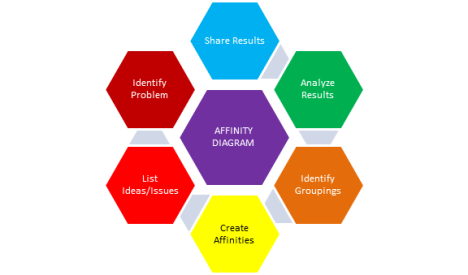
Here’s the steps you take:

Step Description
1. Identify Problem Define your problem or identify a general theme. Example: why has customer satisfaction rate been declining?
2. List ideas/issues List the relevant facts, data, ideas, opinions regarding the subject and put these on the post-in notes or index cards. Post these on a noteboard or blackboard.
3. Create affinities Notice which of these notes or cards are similar and arrange them according to patterns based on those affinities.
4. Identify Groupings Label each group of similar notes or cards with a label for each Affinity group. These could be aspects of the problem under consideration. Prioritize these problems that have been identified.
5. Analyze Results Look at the overall groupings created and the facts/ideas associated with each. What insights does this create with regards to the problem stated at the beginning? Does it suggest potential solutions?
6. Share Results Share the results with the stakeholders at large.

For an example of how this would work with a real-world problem, please go to the following website because I thought they did a great job showing the various steps I outlined above.

http://www.mindtools.com/pages/article/newTMC_86.htm

In conclusion, the affinity diagram or KJ method is a way of synthesizing data and allowing natural patterns to emerge, which allow you to approach the problem in a more organized and systematic way in order to create a more comprehensive solution.   They can be used in conjunction with other quality tools such as the fishbone or Ishikawa diagram to uncover the potential causes of a quality problem.

5th Edition PMBOK® Guide: Chapter 8: Process 8.2 Perform Quality Assurance


This post gives an overview of the second of the three processes in the Quality Management Knowledge Area, namely process 8.2 Perform Quality Assurance, by listing the inputs, tools & techniques of the process, and the outputs.   Perform Quality Assurance belongs to the Executing Process Group, and focuses on the processes, while Perform Quality Control (in the Monitoring & Controlling Process Group) looks at the product or deliverable itself.

1.  Inputs

The first three of the inputs listed for this process are outputs of the planning process 8.1 Plan Quality.  The fourth input comes from the monitoring & controlling process 8.3 Perform Quality Control.


8.2 PERFORM QUALITY ASSURANCE
INPUTS
1. Quality Management Plan Describes the quality assurance approaches for the project.  This is an output of process 8.1 Plan Quality.
2. Process Improvement Plan Describes the continuous process improvement approaches for the project.  This is an output of process 8.1 Plan Quality.
3. Quality Metrics Provides the attributes to be measured and the allowable variations.  This is an output of process 8.1 Plan Quality.
4. Quality control measurements The output of activities from process 8.3 Perform Quality Control.  These measurements are used in this process to analyze the quality of the processes.
5. Project documents Should be monitored in this process in the context of configuration management (so all project team members work from the same version of the project documents).
TOOLS & TECHNIQUES
1. Quality management and control tools The same tools & techniques used in process 8.1 Plan Quality and 8.3 Perform Quality Control are used in addition to the following seven tools:

  • Affinity diagrams
  • Process decision program charts (PDPC)
  • Interrelationship digraphs
  • Tree diagrams
  • Prioritization matrices
  • Activity network diagrams
  • Matrix diagrams
2. Quality audits An organized process that asks the question:  do the project activities conform to the organization’s quality policies, processes, and procedures.  All good practices that conform are identified and put in the lessons learned; those practices that don’t conform are corrected.
3. Process analysis Identifies needed improvements in processes and preventive actions needed through root-cause analysis.
OUTPUTS
1. Change requests All requests for changes that result from an audit are then input into process 4.5 Perform Integrated Change Control under Integration Management.
2. Project management plan updates The following component plans are updated:

  • Quality management plan
  • Scope management plan
  • Schedule management plan
  • Cost management plan
3. Project documents updates
  • Quality audit reports
  • Training plans
  • Process documentation
4. OPAs updates
  • Organization’s quality standards
  • Quality management system (guidelines, policies, procedures)

2.  Tools & Techniques

The seven quality control tools listed are used in addition to those quality tools already listed for the other two processes in Quality Management, 8.1 Plan Quality and 8.3 Perform Quality Control.

I have reviewed all of these techniques in the context of my blog posts on Six Sigma, but for the next few blog posts, I will repurpose these blog posts, because the tools are very useful for Quality Assurance.

3.  Outputs

Since the main question asked by quality audits is whether the project activities conform to the organization’s quality policies, processes, and procedures, if the answer to the question is “no” for some of those activities, they will need to be changed to bring them into conformance.  Those change requests are the first output of this process, which then get fed into the process 4.5 Perform Integrated Change Control.

The quality management plan may be updated as a result of these audits, and the results of the quality audits will be conveyed to the project team and the relevant stakeholders as another output of the process.

The next post will cover the Cost of Quality, because this is important in now only educating stakeholders in why quality activities are being undertaken, but in setting the level of quality for a project.

The next post will cover the seven quality control tools used as part of this process.

5th Edition PMBOK Guide–Chapter 8: Perform Quality Assurance vs. Perform Quality Control


1.   Introduction

The last posts covered the inputs and outputs, as well as some of the tools & techniques of the first quality-related  process, 8.1 Plan Quality.   I was planning on going on to the second quality-related process, 8.2 Perform Quality Assurance, but then it occurred to me that I ought to do an overview of the difference between that second process and the third one, 8.3 Perform Quality Control.

In managing study groups for now two groups of students studying for the CAPM and PMP, the difference between these two processes seems to be a little unclear to many encountering it for the first time.   The reason why is that Assuring Quality and Controlling Quality seem to have the same end in mind, that is, to make sure the quality of the product or project matches what was set forth in Plan Quality, isn’t that right?   Well, the end is the same, but the focus is different.   This post will try to explain why using an analogy to baking.

2.  Quality Assurance vs. Quality Control

The first process is in the planning process group, which should be obvious from the name.   However, the word “perform” sometimes throws people off when it comes to categorizing the other two.   Perform Quality Assurance is actually in the executing process group, and Perform Quality Control is in the monitoring & controlling process group.   The reason is that quality assurance focuses on the work being done; it is being done according to the processes set forth in the Quality Management Plan?   Quality control focuses on the actual deliverables that are a product of that work, to see if they meet the level of quality in the Quality Management Plan.

I have a cookbook which provides me with a source of new recipes if I get bored with making the same old thing.   Many times the recipes work out great, but sometimes … they don’t.    I tried to make chocolate brownies from a low-fat recipe and I couldn’t figure why they came out more gooey than chewy, to put it bluntly.

At this point, I had to analyze, was it a problem with a) the ingredients, b) the recipe, or c) the equipment?    Analyzing whether I followed the steps of the recipe was an example of quality assurance.   Did I omit any steps that the recipe called for?   I couldn’t find any–at first.

Then I went to the ingredients, and tried to see if I skipped any, or added the wrong amount of any of them.   This would be more along the lines of quality control.   Nope, that wasn’t it.    The brownies tasted just fine, but the texture was off.  The final product didn’t seem like it got enough heat, and so was underdone somehow.   That’s when I figured it out–the pan was supposed to be on the middle rack, and I put it on the top rack, so it wasn’t getting the heat it required.

I did a design of experiments, and decided to make another batch with the rack in the middle, like the recipe book actually called for.   Success!   So it was not a problem with the ingredients or the equipment, but the processes I followed, in fact, the very last one of putting it in the oven in the wrong spot.   But this shows you that the focus can be on the processes or the product to find out where a quality problem is.   If you do the processes wrong, or the raw materials do not fit the specifications, or there is a problem with the equipment–any of these things can cause the product to not exhibit the quality that was specified in the quality management plan.   Although they are separate project management processes, they can be done in tandem, although in a company it is usually a quality audit team that sees if the processes are being followed in order to fulfill 8.2 Perform Quality Assurance, whereas the quality control team sees if the product is coming out as it should if the processes are being followed faithfully, in order to fulfill 8.3 Perform Quality Control.

I hope this analogy gives you a feel for the difference between the two–they have the same overall purpose, to ensure good quality in the product, but they have different focuses and that is why they are considered two separate processes.

Having made this distinction a little clearer (I hope), the next post will discuss the inputs and outputs, as well as the tools & techniques of 8.2 Perform Quality Assurance.

5th Edition PMBOK® Guide—Chapter 8: Outputs of Plan Quality Management


1.  Introduction

The purpose of this post is to discuss the outputs to the process 8.1 Plan Quality Management.  This outputs are inputs to the other two quality processes as well as other project management processes from other knowledge areas.

8.1 PLAN QUALITY MANAGEMENT
OUTPUTS
1. Quality management plan Describes how the organization’s quality policies will be implemented, and how the project management team plans to meet the quality requirements.
2. Process improvement plan Details the steps for analyzing project management and product development processes to identify activities which add value.
3. Quality metrics Describes an attribute of the project or product and how the quality control process will measure it.  They are used in both the quality assurance and control quality processes.
4. Quality checklists Verifies that a set of required steps has been performed.  They should incorporate the acceptance criteria included in the scope baseline.
5. Project documents updates
  • Stakeholder register
  • Responsibility assignment matrix
  • WBS and WBS dictionary

2.  Outputs of Plan Quality Management

a.  Quality Management Plan

The main output of the process 8.1 Plan Quality Management is the Quality Management Plan.  This outlines the quality policies that will be implemented, so that they can be audited in the next process 8.2 Perform Quality Assurance, and the quality requirements that the management team plans to meet, which is demonstrated during the monitoring and controlling activities that take place in the process 8.3 Control Quality.

b.  Process Improvement Plan

The definition of a project has been changed in the 5th Edition of the PMBOK® Guide.  Before it was “a unique product, service, or result”; now it’s “a unique product, service, or result OR an improvement on an existing product, service, or result.”  This expanded definition of what a project is allows for process improvement like Six Sigma to be included as projects as well.

The Process Improvement Plan is one of the four subsidiary plans (the other three are Change Management, Configuration Management, Requirements Management) in the Project Management Plan, which consists of the performance baselines and the knowledge area management plans (like the Quality Management Plan) in addition to the subsidiary plans.

Here are the elements of the Process Improvement Plan

  •       — Process boundaries (the purpose of the process, its inputs and outputs, process owner, and the stakeholders of the process)
  •        –Process configuration (showing how the various processes fit together)
  •       — Process metrics (if there are any control limits to the processes)
  •       — Targets for improved performance

The process configuration and process boundaries are analogous to the WBS and the WBS dictionary, respectively, but for processes rather than activities, in that they show how they fit together and they give details concerning them.  The metrics and the targets for improved performance show what the current performance baseline is for the current state of the processes and the future (“new and improved”) state of those processes.

c.  Quality Metrics

What are the measurable project or product attributes that can be monitored and controlled in order to control the quality?  On-time performance, defect frequency, failure rate, are all examples of such quality metrics.

d.  Quality Checklists

Checklists are used to ensure consistency in tasks, to remove the variability that the human element naturally brings.

e.  Project Document Updates

  •      Stakeholder updates (to include who gets involved in decisions about various processes, or who gets informed    about them)
  •      Responsibility assignment matrix (to include who “owns” the various processes
  •     WBS and WBS dictionary

The first three of these five outputs (Quality Management Plan, Process Improvement Plan, Quality Metrics) will turn into inputs for the next process 8.2 Perform Quality Assurance, which is the subject of the next post.

The Hometown Parade: Getting our Veterans Back


I moved to Homewood, my home town, at the beginning of April in order to assist my father whose health was failing him and who needed my help to set up long-term health care so that he could regain much of the mobility he had lost in the hospital.

Today was Memorial Day and after seeing Dad (who was a veteran of the Korean War era) in the rehabilitation facility, I returned home and walked to downtown Homewood just in time to see the hometown Memorial Day parade. It was very simple: representatives of the various armed forces were escorted by the policemen and first responders whose vehicles were flashing lights but silent out of respect for the fallen servicemen to whom this day was dedicated.

Along the side of the road were the residents of Homewood, including Boy Scout troops selling American flags, proud parents of the children in the various marching bands, and the families of the veterans for whom the parade was being put on. We all waved and applauded as the various veterans groups passed, and I had a tear in my eye when the patriotic songs were being played by the marching bands which followed.

I had a chance to see the young boys and girls who had braved the inclement weather in order to be part of a parade, and then when they passed–it was over, almost as soon as it began! Everybody followed the last part of the parade as they went over to the Veterans Memorial in downtown Homewood.

By then the veterans had gathered, and I heard speeches from the heads of the local veterans group, very brief and to the point. Finally the wreaths were laid, one for each of the major conflicts of the past century: World War I, World War II, the Korean War, the Vietnam War, and the Gulf War. I assumed that this covered both the first and the second Gulf War and the subsequent war in Afghanistan, and I was sobered by the fact that it has lasted longer than any of the other wars, or as the papers like to refer to them these days, “conflicts.”

I was so heartened by the presence of the community coming together to honor the veterans who had passed away, and those who were still among us, although some of them endured wounds which they will carry for the rest of their lives. Each of the missing veterans has left a hole in the lives of the families left behind, and it was important for us all to try to fill that gap as best we could, with memories of their lives.

For if we don’t remember, then we will not have a chance to weave together again the tattered fabric that remained when they left us, or when a part of them was taken away from their own lives. I loved hearing their speeches, and the only thing I felt when I left was gratitude for what they had done for us, and a longing to hear more. As Sebastian Junger wrote in today’s Washington Post:

“Let them speak. They deserve it. In addition to getting our veterans back, we might get our nation back as well.”

What do we remember on Memorial Day?


When all of the pleasant associations of Memorial Day with the vacations, the start of summer, and barbecuing are taken into account, when else do we remember on Memorial Day?

Just like the three ghosts encountered by Ebenezer Scrooge in Charles Dickens’ A Christmas Carol, we are confronted with three specters. Usually the ghosts of Soldiers Past and Soldiers Present are whom we honor in cemeteries and in our parades, but I think we need to pay attention more to the ghosts of Soldiers Future.

When I say we honor the ghosts of Soldiers present, I’m referring to those veterans who have wounds, visible and otherwise, that are in the process of healing.

The greatest war poem in Western Civilization, the Iliad, has as its companion the greatest poem about the adjustment of a veteran (Odysseus) who in his various adventures in The Odyssey) tries to adjust to domestic life again in a post-world world. It takes him almost as many years as the war in which he fought.

The ghosts of Soldier Future I referred to are the kids who make up the audience of both the parades and the not-so-solemn entertainments that take place this weekend. Can we make sure that they do not needlessly die as soldiers in some future conflict because we did not have the courage to find a solution other than a military one?

I do not take the sacrifice of soldiers past and present lightly, and that is the very reason why I will resist sacrificing yet another generation of soldiers unless I understand the reason for that sacrifice, so that I know it is commensurate with the value of those soldiers’ lives.

And that is why I remember the past and recall the present on Memorial Day.